A partial view is a reusable CSHTML fragment. It combines HTML and Razor expressions, then contributes its output to a parent view or layout. Use one when the same markup would otherwise be copied into several places. section 22.5 section 22.5.2
Create a regular Razor view for the fragment and declare the type of data it receives with @model. For example, Views/Home/_RowPartial.cshtml can declare @model Product and render a table row from @Model.Name and @Model.Price. There is no special partial-view file format. section 22.5.2
Enable MVC tag helpers in the relevant _ViewImports.cshtml file with @addTagHelper *, Microsoft.AspNetCore.Mvc.TagHelpers. Then place <partial name="_RowPartial" model="p" /> inside a parent view’s foreach loop to generate one row per product. Request /home/list to see the resulting table. section 22.5.1 section 22.5.3
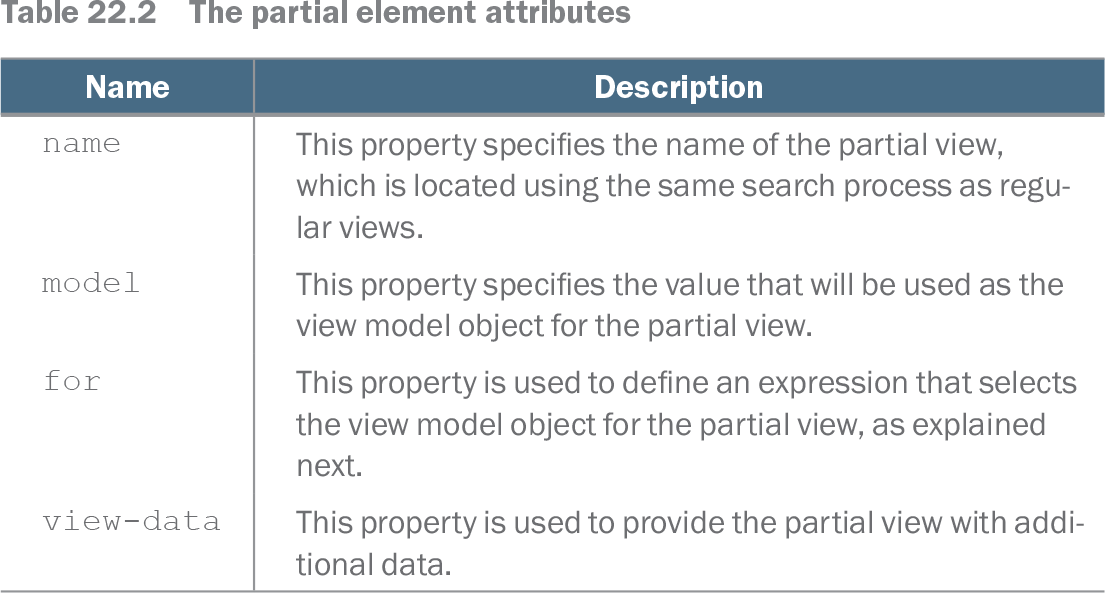
The partial element controls what gets rendered and what data it receives:
- name selects the partial using normal view lookup; model supplies its view-model object. section 22.5.3
- for selects a property of the parent model instead: a row partial can pass its Name property to a nested, string-model cell partial. section 22.5.3
- view-data supplies additional data to the partial. section 22.5.3
Share a fragment with Razor Pages
Place _ProductPartial.cshtml in Pages/Shared, declare @model Product, and render it from a Razor Page with <partial name="_ProductPartial" model="Model.Product" />. Pass the Product, not the page model. The fragment has no @page directive or page model, so MVC views can share it too. For Razor Pages, lookup starts beside the page, moves through parent folders to Pages, then checks Pages/Shared and Views/Shared. section 23.5.2
A partial’s data comes from its parent. If an embedded feature needs independently obtained data, avoid fetching it inside the partial or expanding every parent view model just to supply it; a view component provides supporting logic and data. For shared form markup, a partial can be paired with a page-model base class that holds common code. section 24.2 section 31.3.1
Listing 22.27 Using a partial view in the List.cshtml file in the Views/Home folder
@model IEnumerable<Product>
@{
    Layout = null;
    decimal average = Model.Average(p => p.Price);
}
<!DOCTYPE html>
<html>
<head>
    <link href="/lib/bootstrap/css/bootstrap.min.css" rel="stylesheet" />
</head>
<body>
    <h6 class="bg-secondary text-white text-center m-2 p-2">Products</h6>
    <div class="m-2">
        <table class="table table-sm table-striped table-bordered">
            <thead>
                <tr><th>Name</th><th>Price</th></tr>
            </thead>
            <tbody>
                @foreach (Product p in Model) {
                    <partial name="_RowPartial" model="p" />
                }
            </tbody>
        </table>
    </div>
</body>
</html>
The complete List.cshtml listing shows the partial inside a foreach loop, with each Product passed as its model. section 22.5.3
Table 22.2 The partial element attributes (view table figure)
| Name |
Description |
|---|---|
| name |
This property specifies the name of the partial view, which is located using the same search process as regular views. |
| model |
This property specifies the value that will be used as the view model object for the partial view. |
| for |
This property is used to define an expression that selects the view model object for the partial view, as explained next. |
| view-data |
This property is used to provide the partial view with additional data. |
The attribute table is a quick reference for name, model, for, and view-data. section 22.5.3