liveBook · Manning

Template engine

As explained in Spring Start Here, Second Edition

A template engine is software that combines a view template with data to generate rendered output such as HTML.

A template engine combines a view template with data from a controller to render a dynamic page. The same view can display different content for different requests. section 8.0 section 8.4

In a Spring MVC app, the basic flow is:

  • Add a template engine dependency, then place view data in the controller’s Model using named attributes. section 8.1
  • Return the view name; the template uses the attribute names to display the supplied values. section 8.1

A personalized greeting

A controller supplies the username “Katy” and color “red”; a Thymeleaf HTML template displays the name in that color. section 8.1

Figure 8.1 A dynamic view presented with the Manning shopping cart functionality. Even if the requested page is the same, the content of the page is different. The backend sent different data in the HTTP response before and after adding one more product to the cart.
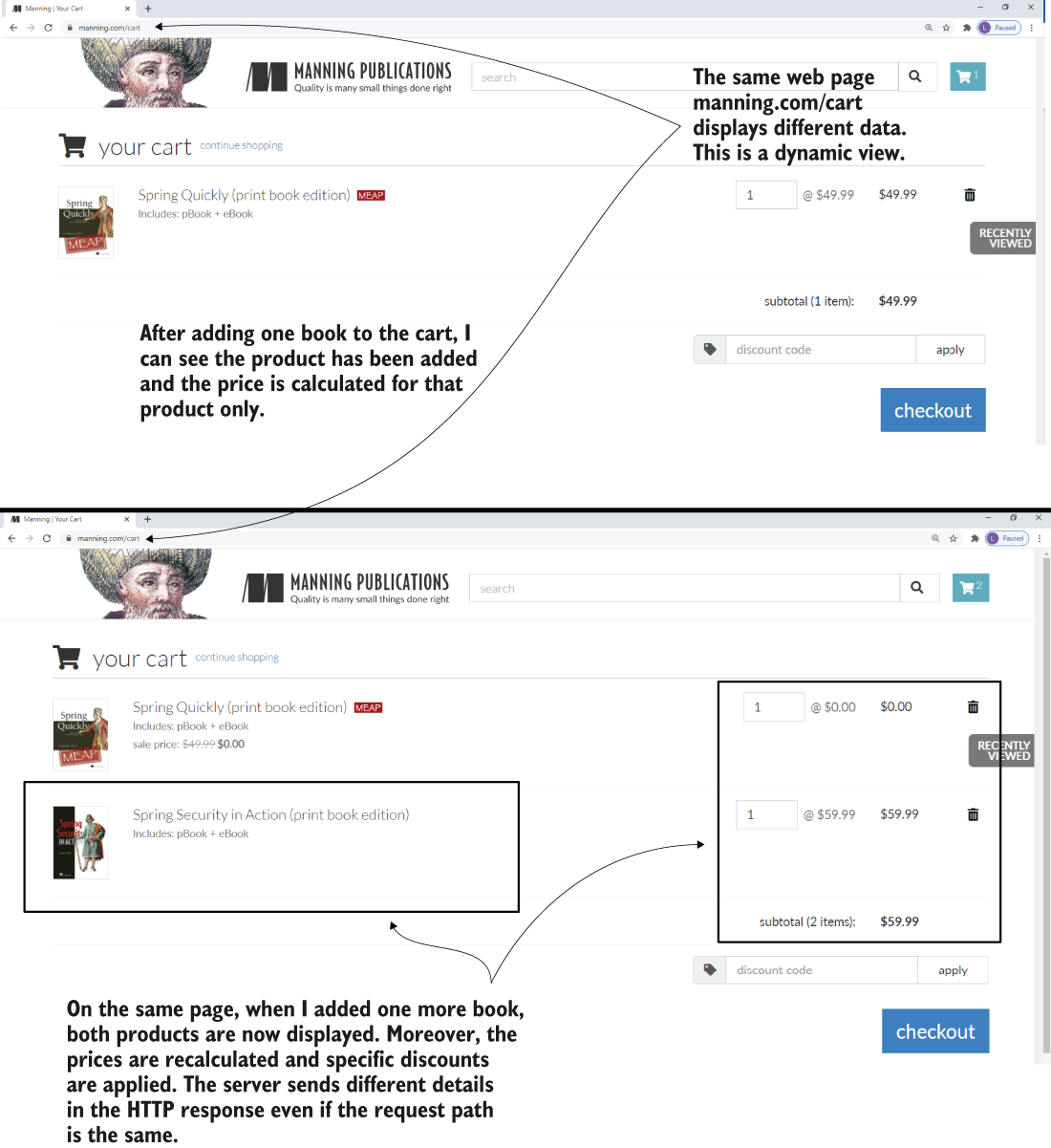
The cart illustration shows how one view can display a different product list as the cart changes. section 8.1


How Spring Start Here, Second Edition covers it

How deep it goes
Works through dependency setup, controller attributes, and template use, without detailing engine internals.
Examples
Uses a colored username greeting and a shopping cart whose displayed product list changes.
What it assumes
Builds on familiarity with a basic Spring MVC web app and its controller-to-view flow.
What you can do after
Build a dynamic Spring view by passing named controller attributes into a Thymeleaf template.
How it connects
Connects dynamic views with Spring MVC controllers, Model data, and Thymeleaf templates.

Also explained in

Compare how 6 books explain template engine →

Related concepts

This explainer was generated by Manning's knowledge graph from the text of Spring Start Here, Second Edition. The section links point to the parts of the book it draws on.