Array slicing selects elements or subarrays with positions and ranges. In Julia, square-bracket access handles both retrieval and assignment, so the same notation works for vectors, matrices, and higher-dimensional arrays. section 14.4 section 14.7
Build slices incrementally:
- Use one-based positions such as A[3], or use begin and end when the exact array length should not matter: A[begin+2] and A[end-1]. section 14.4
- Use ranges such as A[2:5] to select several elements, and A[:] to select every element. section 14.4
- Apply row and column ranges to matrices; A[:, 4] selects a column, while A[2, :] selects a row. section 14.4
- Remember that ordinary slices return copies. Use @view when a slice should refer directly to the original data and avoid copying. section 14.4 section 14.7
Copy or view?
julia> A = [8, 1, 2, 7]; julia> B = A[:]; julia> B[2] = 42 julia> A [8, 1, 2, 7] A[:] creates an independent copy. By contrast, B = @view A[3:end] creates a view; assigning B[2] = 1331 also changes the corresponding element of A. This distinction matters when repeated slicing would copy large arrays. section 14.4
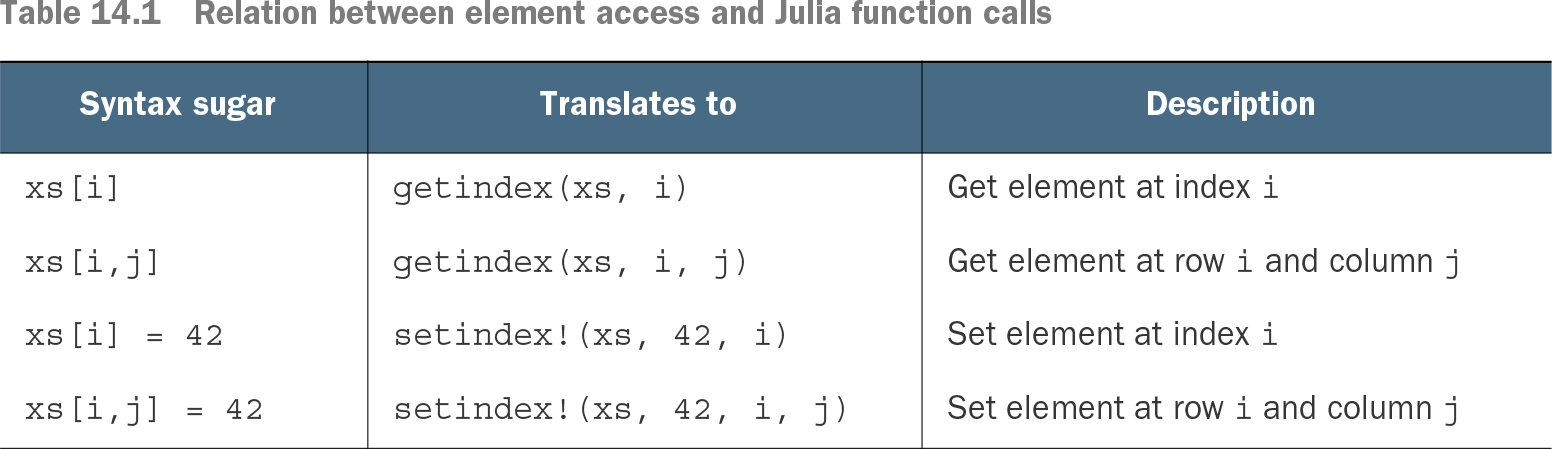
Table 14.1 Relation between element access and Julia function calls (view table figure)
Map square-bracket element access and assignment to the underlying getindex and setindex! function calls. section 14.4