An instance needs an AMI and a subnet ID, but hardcoding either value makes the configuration brittle: images are updated, and subnet IDs differ between accounts. A Terraform data source looks up existing information and exposes it for use elsewhere in the configuration. It reads data; it does not create or modify the object it finds. section 2.1.4 section 2.6
A data block resembles a resource block: it has a type, a local name, arguments, and attributes. Its arguments select data from a provider; other blocks can then reference the resulting attributes. For example, a VPC lookup can supply its ID to a subnet lookup, while an AMI lookup can supply an image to an instance resource. section 2.6
Listing 2.2 Using Terraform to look up data
data "aws_vpc" "default" {                  #1
  default = true
}

data "aws_subnets" "default" {
  filter {                                  #2
    name   = "vpc-id"
    values = [data.aws_vpc.default.id]      #3
  }
}

data "aws_ami" "ubuntu" {
  owners      = ["099720109477"]            #4
  most_recent = true

  filter {                                  #5
    name   = "virtualization-type"
    values = ["hvm"]
  }

  filter {
    name   = "name"
    values = ["ubuntu/images/hvm-ssd/ubuntu-focal-20.04-amd64-server-*"]
  }
}
The AWS configuration looks up the default VPC, filters subnets by that VPC’s ID, and selects a recent Ubuntu AMI using its owner and image filters. Notice the reference from one data source to another: `data.aws_vpc.default.id`. section 2.1.4
Pass a looked-up subnet into a module
A workspace can look up the default VPC and its subnets, then pass `data.aws_subnets.default.ids[0]` as a module’s `subnet_id`. This keeps the module configurable without embedding an account-specific subnet ID. Initialize the workspace with `terraform init`, review the plan, and apply it with `terraform apply`. section 3.8.4
Check what a lookup returns before relying on it. If `aws_ami` finds no match, it generally raises an error and stops the plan. A lookup for a variable number of objects can instead return none: `aws_subnets` may expose an empty `ids` list. Also, `most_recent = true` means a newly published matching AMI can change the lookup result. section 2.6 section 2.1.4
Data sources also appear in Terraform state alongside managed resources, with identifying metadata and attributes. When another configuration needs a resource’s value, consider a direct data-source lookup before `terraform_remote_state`: state access can expose sensitive attributes. Direct lookup is not always possible or precise enough; input variables or remote state may still be needed. section 6.3.4 section 6.7.3
Read a local file
`data "local_file" "foo" { filename = "${path.module}/config.txt" }` reads a file and exposes its contents and checksum attributes. Use `local_sensitive_file` when attributes containing file contents should be marked sensitive. Unlike the `file` function, these data sources can participate in provisioners, conditions, and dependencies. section 10.5.2
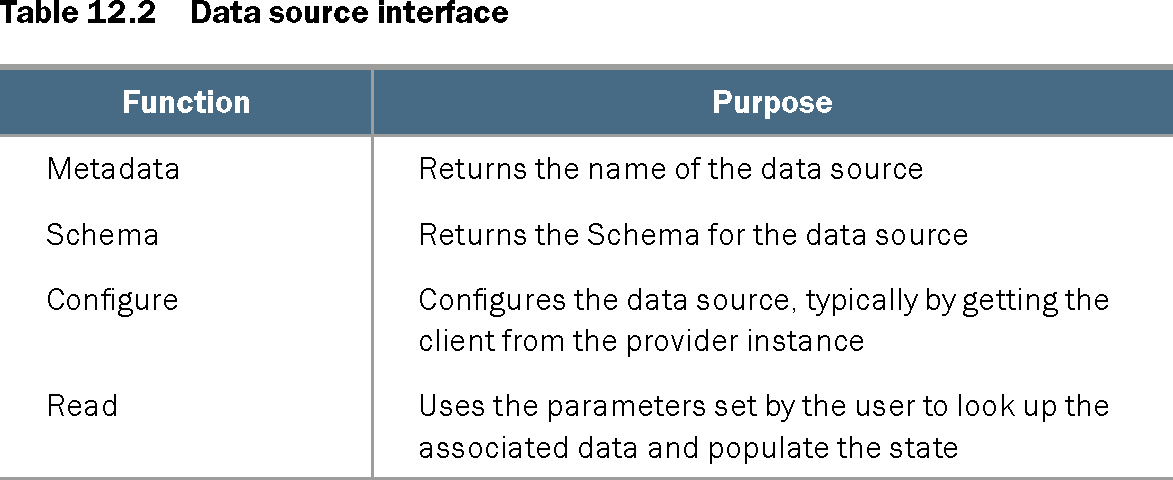
For a custom provider, a data source implements metadata, a schema, configuration, and a `Read` function that uses its parameters to look up data and populate state. Configuration can receive the provider’s client; registering the data source constructor makes it available to users. An external-provider lookup can call a local program when no suitable data source exists, but is a last resort because it adds delivery-environment and maintenance requirements. section 12.5 section 12.5.2 section 12.5.4 section 10.4
Table 12.2 Data source interface (view table figure)
| Function |
Purpose |
|---|---|
| Metadata |
Returns the name of the data source |
| Schema |
Returns the Schema for the data source |
| Configure |
Configures the data source, typically by getting the client from the provider instance |
| Read |
Uses the parameters set by the user to look up the associated data and populate the state |
The interface table separates the provider-development responsibilities: name the data source, define its schema, configure its client, and implement the lookup in `Read`. section 12.5