Text analysis prepares human-readable text for meaning-aware search. Rather than storing a sentence only as an exact string, Elasticsearch cleans it, splits it into tokens, enriches or normalizes those tokens, and stores them in an inverted index. Searches can then match root words, synonyms, abbreviations, spelling variations, and other query forms more effectively than exact database-style matching. section 7.0 section 1.3.1
Analysis applies to fields mapped as text, not to other field types. At indexing time, the analyzer transforms a text field before persistence. At search time, full-text queries are analyzed too, commonly with the same analyzer, so query tokens can match the tokens already stored in the inverted index. section 7.1.2 section 3.1.3
An analyzer performs a pipeline with three kinds of components:
- Character filters optionally remove or transform unwanted input characters before tokenization. section 7.9
- Exactly one tokenizer splits the prepared input into individual tokens. section 7.9
- Zero or more token filters normalize or enhance tokens, such as lowercasing, stemming, synonym handling, or removal. section 7.9 section 4.5.1
From movie review to searchable tokens
For the review “The movie was sick!!! Hilarious :) :) and WITTY ;) a KiLLer 👍”, character filtering strips punctuation, tokenization separates words, lowercasing normalizes case, and later filtering can reduce words to stems. The resulting tokens make varied query wording easier to match than the original sentence would be. section 4.5.1
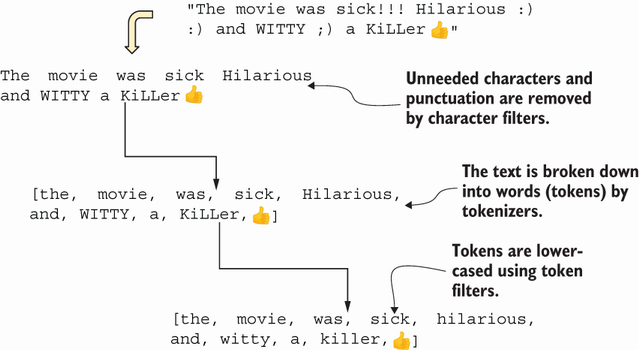
Follow the standard-analyzer pipeline to see how one full-text field changes during indexing, from raw review text to normalized tokens. section 4.5.1
Choose analyzers for the search behavior required by the field. Elasticsearch provides a standard analyzer by default and also offers built-in keyword, simple, stop, whitespace, pattern, language-specific, and custom analyzers. Different analyzers may be selected for indexing and search when requirements differ. section 7.0 section 7.1
Analysis improves flexible full-text retrieval, but it costs computation. A keyword field skips analysis and requires an exact value match, making it useful where keyword-style searching is acceptable. A multi-field can retain analyzed text search alongside a keyword representation of the same value. section 15.1.3 section 9.1.2

