Typography is the arrangement of written text so people can read it, understand what matters first, and feel the intended tone. In data visualization, it is a stagehand rather than the star: text should be legible and useful without constantly demanding attention. Font choice, size, weight, spacing, color, and placement all shape that quiet work. section 5.0 section 5.2
Start with readability. Avoid text that is too fine, bold, cramped, loose, tiny, oversized, low-contrast, or decorative to read comfortably. The goal is not typographic flair for its own sake; it is helping labels, annotations, and supporting text remain clear while the visualization tells its story. section 5.2
Use typography to establish hierarchy: show viewers where to begin and which information deserves attention. Contrast creates the visual interest that makes this possible. Vary size, weight, or other type treatments deliberately, then repeat a consistent style for elements with the same importance. If everything receives emphasis, nothing does. section 5.4 section 5.4.5
For accessible text, make choices that help readers track and distinguish content:
- Allow text to remain usable when resized; WCAG criterion 1.4.4 calls for resizing to 200% without losing content or functionality, except for captions and images of text. section 5.5.1
- Limit line length and add space between lines and paragraphs so readers can keep their place and follow the flow. section 5.5.1
- Avoid full justification when its stretched or compressed word spacing creates distracting rivers of white space or impedes readability. section 5.5.1
A restrained dashboard hierarchy
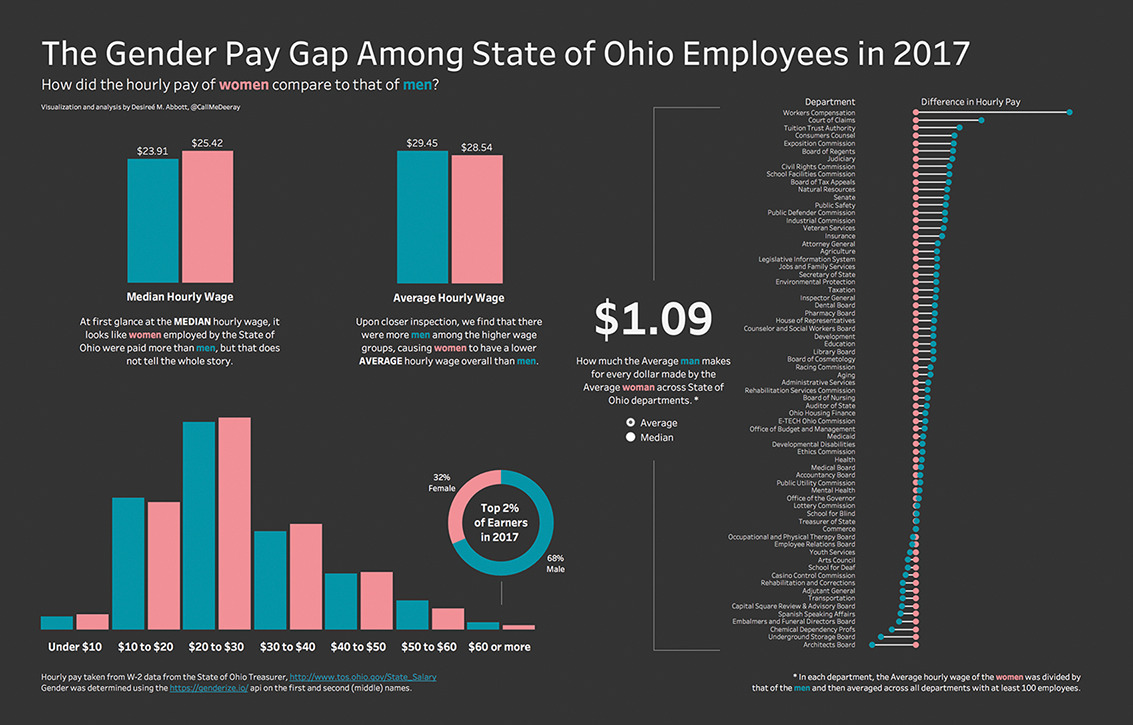
A dashboard can maintain one typeface and one text color for consistency, then reserve variation for a few meaningful signals. A large, slightly heavier main header gives viewers a starting point; larger and heavier metric values distinguish key figures; tooltips can use a larger default size for a zoomed-in, more readable feel. section 8.4.3
Figure 5.23 This is an interactive visualization I made in 2018 (direct link to viz: http://mng.bz/p1wE) using publicly available payroll data for employees of the State of Ohio. I used a single typeface, the Tableau typeface, throughout the visual to maintain consistency and simplicity, although I could have done a better job at keeping the number of fonts (styles) lower.
Inspect a visualization that uses one typeface throughout to support consistency and simplicity while still creating hierarchy through typographic styling. section 5.4



