Typography is how written text looks and sits on a page: its typeface, size, weight, style, letter spacing, line height, and color. On a website, it helps visitors read comfortably and understand what matters first. A theme supplies starting defaults, but adjust them for the site’s topic and audience rather than treating them as final. section 4.0 section 4.4
Start with readability. Body text must be large enough to read, and text needs clear contrast against its background. Dark text on a light, plain background is usually the dependable choice; busy imagery or low-contrast colors make reading harder, especially for people with poor eyesight. section 4.1 section 4.1.4
Refine typography in a practical order:
- Choose a readable typeface for body text, headlines, and captions. Use the font family, style, and weight to suit the site’s design without sacrificing legibility. section 4.0 section 4.1
- Set body text around 16–18 px, increasing it when the typeface is thin or when visitors will read long passages. Screen pixels are relative units, not fixed physical measurements. section 4.1.2 section 4.1
- Adjust line height—the white space between lines—alongside font size and typeface. Values of 1.5 or 2 are common; too little space hurts readability, while too much makes lines feel disconnected. section 4.1.2
- Make headings and subheadings visibly distinct from each other and body text, usually through size or weight. They should summarize and introduce the content below them. section 4.1.5
- Keep sizes, typefaces, and colors consistent across the site, then check the result on different devices and screen sizes. section 4.1.5
Reviewing a pet-adoption site
After setting the type size, typeface, color, line height, and letter spacing, ask an AI assistant for an objective review of a site’s typography. A useful prompt is: “Please tell me the pros and cons of this website’s typography: sitename.com.” Review its suggestions yourself. For a pet-adoption site, useful observations included readable sans serif text and suitable desktop/mobile sizing, but limited hierarchy, emphasis, and distinctiveness. section 4.1.6
In WordPress, open Appearance > Customize > Typography to modify size, typeface, and related settings; a theme may label this area “typeface” or “text” instead. To explore a large font collection, install and activate Easy Google Fonts or Fonts Plugin | Google Fonts Typography through Plugins > Add New, then choose a suitable typeface in the customizer. section 4.1.2 section 4.1.2
Treat typography as part of the full website experience. Choose accessible, easy-to-read fonts; consider multilingual font versions when needed; and test page-load speed because some fonts take longer to load. Use typography to make a hierarchy clear, but do not let visual novelty disrupt the words visitors need to read. section 4.1.5 section 6.9.1
Figure 6.20 GPT had a different reaction to this more contemporary version of our practice site’s home page.
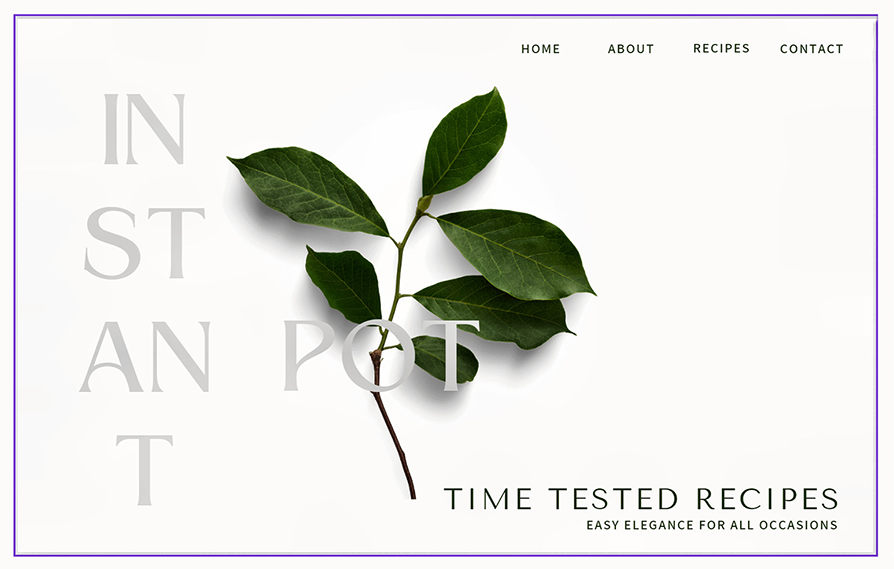
Inspect the minimalist home-page design to see why dispersed headline words can interrupt readability and why kerning and white space affect visual emphasis. section 6.9.1



