User-interaction testing evaluates software through its user interface, using tools that act like a person: opening pages, finding controls, clicking links, entering data, and checking what appears. It sits at the top of the testing pyramid. The boundary between UI testing and behavioral testing can be blurry because proving a feature works may require interacting with the interface. section 8.1.1 section 8.10
Use UI tests selectively because each test exercises the entire web stack:
- A browser enters information, sends a request to the server, triggers server and database work, receives a result, and displays it. section 8.1.1
- This full round trip makes UI tests slower and more expensive than unit, integration, or behavioral tests, especially when many input variations are required. section 8.1.1 section 8.10
- Keep most tests lower in the hierarchy and reserve UI tests for behavior that genuinely needs browser-level verification. section 8.1.1 section 8.10
Driving a Django page with Selenium
Selenium integrates with a web browser and offers two approaches. Click-and-record captures actions for playback and is quick to learn, but small page changes can make recordings fragile. API-based tests search HTML elements and interact with them in code; assigning IDs to tags makes selectors easier to maintain. In Django, TestCase calls views directly and does not execute JavaScript. Use LiveServerTestCase when the test must see the page as a browser does; use StaticLiveServerTestCase when CSS and JavaScript also need serving. Create test data in setUp(), then call Selenium from the test methods. section 8.7.1 section 8.7.1
Figure 8.1 Hierarchy of testing categories
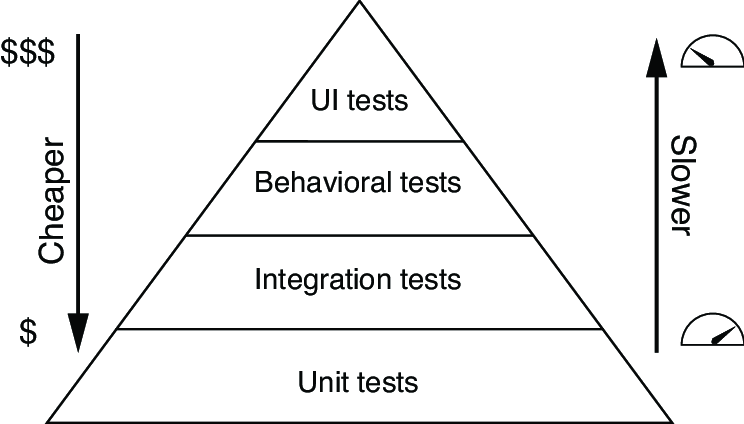
Use the testing hierarchy to place user-interaction testing above unit, integration, and behavioral testing, then weigh its broad coverage against its cost. section 8.1.1

