A VLAN (Virtual LAN) is a logically isolated LAN created within a physical switch. It divides one Layer 2 broadcast domain into multiple broadcast domains, improving segmentation, security, and performance. Unlike subnets, which segment at Layer 3, VLANs segment at Layer 2. section 12.0 section 12.1.2
VLAN behavior follows these practical rules:
- Assigning switch ports to different VLANs makes the switch behave like multiple virtual switches. The switch does not forward or flood frames between VLANs. section 12.1.2
- Hosts in different VLANs cannot communicate directly; communication between them requires routing through a router or multilayer switch. section 12.0
- An access port belongs to one VLAN and normally connects to an end host. A trunk port carries multiple VLANs between switches using tagged frames. section 12.2.2 section 12.3
- For CCNA practice, use a one-to-one relationship between VLANs and subnets: one subnet per VLAN. section 12.1.2
Creating VLANs and assigning access ports
On SW1, VLANs 10, 20, and 30 can represent Engineering, HR, and Sales. Configure each interface range as an access port, then assign its VLAN: interface range g0/0-3 with switchport mode access and switchport access vlan 10; interface range g1/0-3 with the same commands for VLAN 20; and interface range g2/0-3 for VLAN 30. Verify the VLAN database and port assignments with show vlan brief. section 12.2.1 section 12.2.2
Figure 12.4 By assigning SW1’s interfaces to three separate VLANs, SW1 is divided into three virtual switches, each a separate broadcast domain. G0/0, G0/1, G0/2, and G0/3 are part of VLAN 10. G1/0, G1/1, G1/2, and G1/3 are part of VLAN 20. G2/0, G2/1, G2/2, and G2/3 are part of VLAN 30. SW1 will not forward or flood a frame out of ports in a different VLAN than the port the frame was received on.
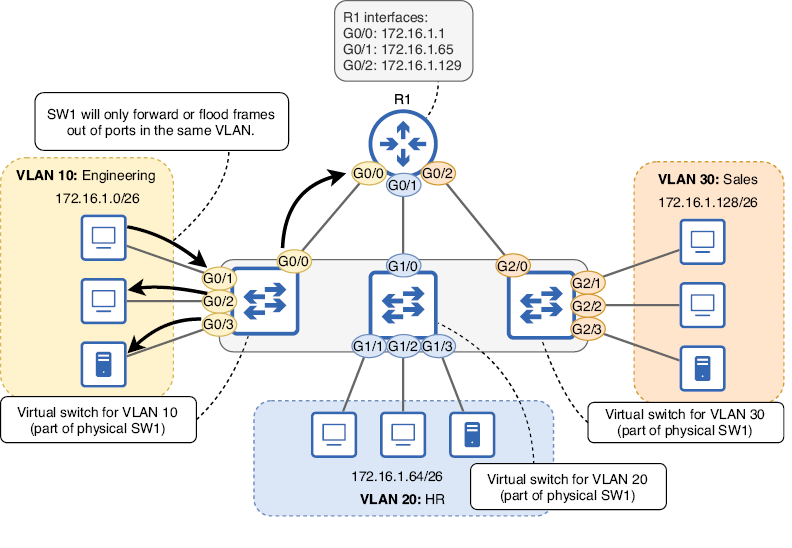
Visualize one physical switch divided into three virtual switches, with separate ports and broadcast domains for VLANs 10, 20, and 30. section 12.1.2
