A web app can work for one person yet block another who uses touch, has low vision, or relies on an assistive technology. The Web Content Accessibility Guidelines (WCAG) give teams a shared way to identify and address such barriers. Published by the World Wide Web Consortium (W3C), WCAG is an international technical standard for digital accessibility, not a law. It also applies to mobile apps and digital documents. section 1.5 section 1.5.1
WCAG organizes its guidance around four principles, often shortened to POUR:
- Perceivable: people must be able to perceive content through different senses. section 1.5.1
- Operable: people must be able to use functionality in different ways. section 1.5.1
- Understandable: content and behavior must be understandable and predictable. section 1.5.1
- Robust: content must work across technologies, including assistive technologies. section 1.5.1
Under these principles sit guidelines and testable success criteria. The success criteria are the requirements used to determine conformance; supporting explanations, techniques, and examples help you apply them but are not themselves required for conformance. Criteria have three cumulative levels: A, AA, and AAA. Meeting AA means meeting its criteria and those at A; meeting AAA also includes both lower levels. section 1.5 section 1.5.1
Turn a requirement into an implementation choice
If a page needs identifiable headings, use HTML h1–h6 elements for them. WCAG’s HTML technique H42 gives this as a concrete way to address accessibility guidance. Start with the barrier a person faces, then use the relevant success criterion and its supporting techniques to choose and check an implementation—not merely to collect technique codes. section 1.5.1
Figure 1.2 This image illustrates the various components in WCAG 2.2. Guidelines are organized under four principles. Each of the 13 guidelines includes normative success criteria: the requirements used to determine conformance at levels A, AA, or AAA. WCAG also provides informative supporting material, including techniques, understanding documents, testing rules, and additional guidance to help explain and apply those requirements.
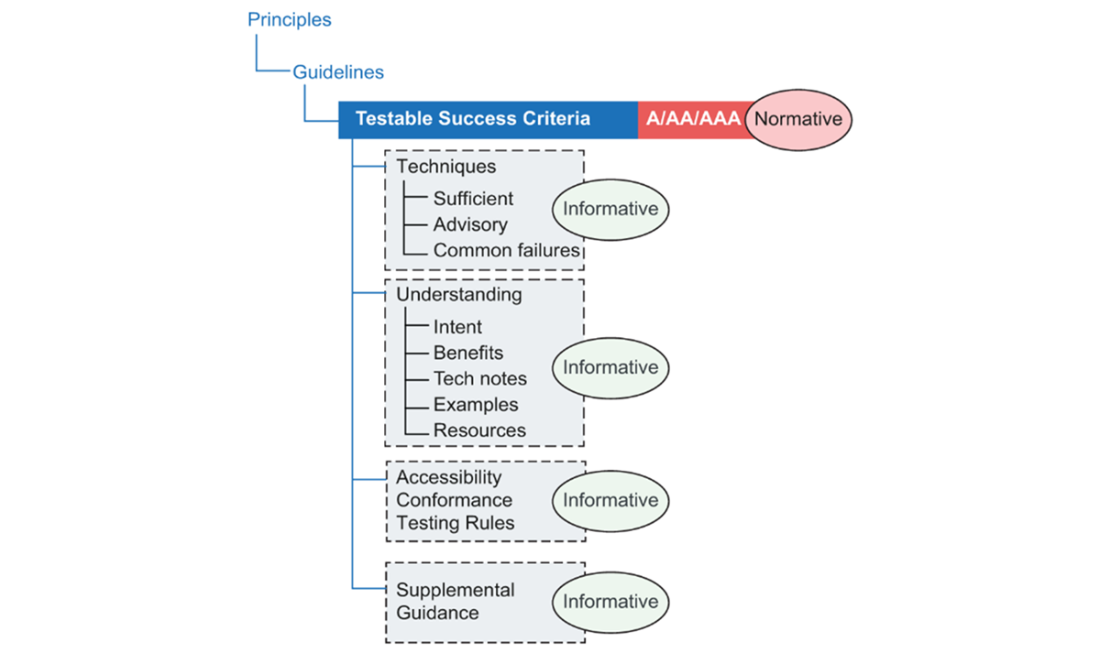
Use this map to move from a POUR principle to a guideline and its required success criteria, then to supporting implementation and testing guidance. section 1.5.1
TIP: The W3C’s WCAG Quick Reference lets you filter guidelines, success criteria, techniques, and failures for the technology you use. NOTE: Check the version applicable where your app will be used. WCAG 2.1, released in 2018, added attention to mobile use, low vision, and some cognitive needs; WCAG 2.2, released in October 2023, is the latest published recommendation identified here. WCAG 3 remains a draft. Conformance matters, but keep people’s barriers—not a version number alone—at the center of design and development. section 1.5 section 1.5.1 section 1.5.3