A web application is software that provides functionality through web technologies and a browser or other web client. A user navigates to a URL, and the client sends an HTTP request to the server hosting the application. The application processes the request and returns an HTTP response containing a status code and, often, generated HTML. section 1.4.1
In ASP.NET Core, the application runs with a web server—typically Kestrel—inside a .NET process. Kestrel receives requests and returns responses, while the same application can run directly on a network or behind a reverse proxy such as IIS, NGINX, Apache, or a managed PaaS proxy. section 27.1
Common ASP.NET Core web-application forms include:
- Razor Pages and MVC controllers build server-rendered, page-based applications that return HTML. section 19.2 section 1.6
- Minimal APIs and web APIs build RESTful or HTTP APIs rather than browser-oriented pages. section 1.6
- Blazor WebAssembly runs client-side in the browser, while Blazor Server sends stateful UI updates through a WebSocket connection. section 1.6
A small MVC web application
Create an ASP.NET Core Web App (Model-View-Controller) project in Visual Studio or with dotnet new mvc. The template configures MVC controllers with Razor views, maps a conventional route such as {controller=Home}/{action=Index}/{id?}, and produces a server-rendered application that can be run with F5 or dotnet run. section 19.2
Figure 1.2 Requesting a web page. The user starts by requesting a web page, which causes an HTTP request to be sent to the server. The server interprets the request, generates the necessary HTML, and sends it back in an HTTP response. Then the browser can display the web page.
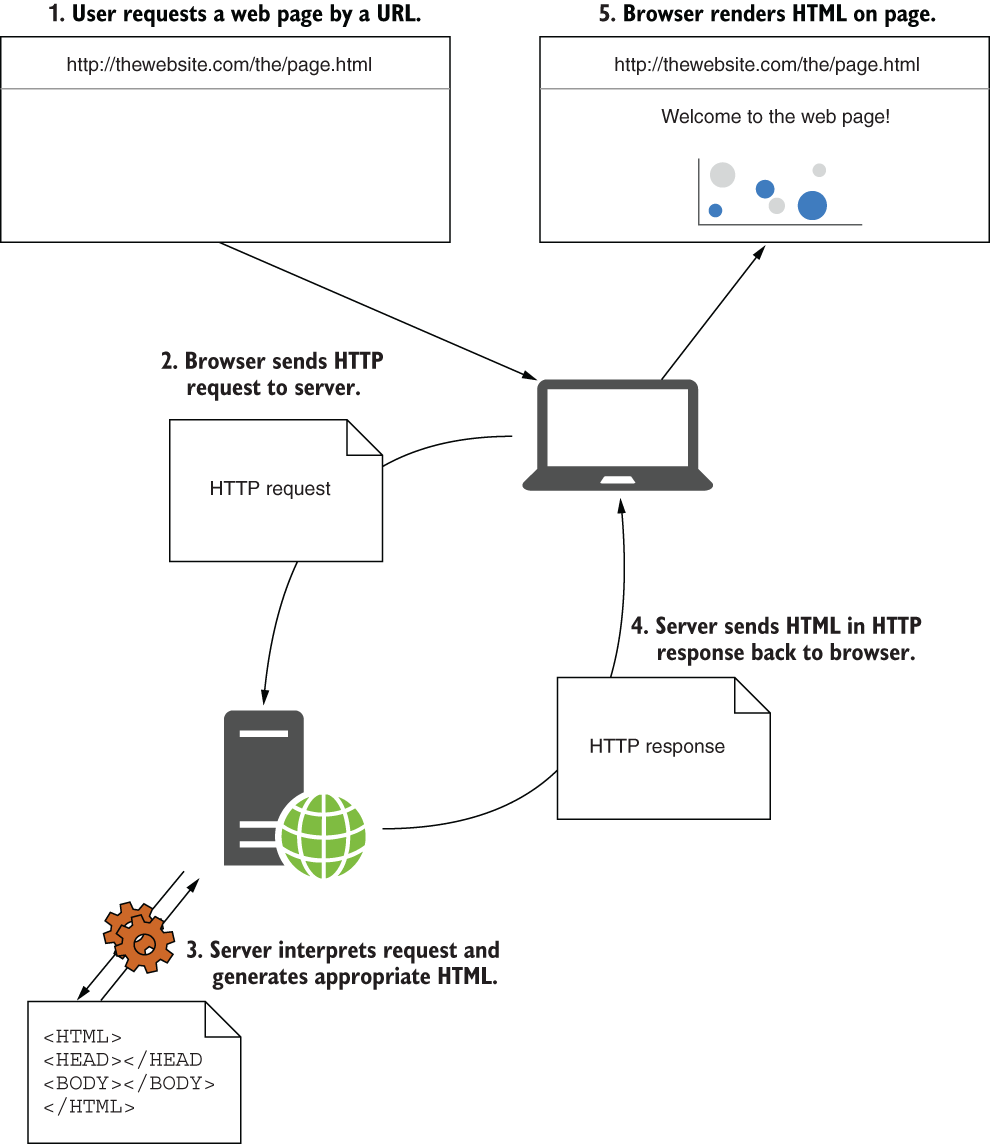
Follow the request from a browser to the server, then trace the generated HTML back to the browser as an HTTP response. section 1.4.1







