A web application provides features through a service hosted on the public internet. Web browsers and mobile clients send requests to that service, which handles application logic and may use a database, external APIs, or other services. Some applications store state; others remain stateless. section 1.2.2
Figure 1.3 Simplified architecture diagram of a web application ecosystem. Clients, such as web browsers and mobile devices, interact with the core application service, which handles user requests and implements business logic. The service interacts with a database to store and manage application data. Additionally, the service communicates with external APIs to access additional functionality and interacts with external services utilized by the application.
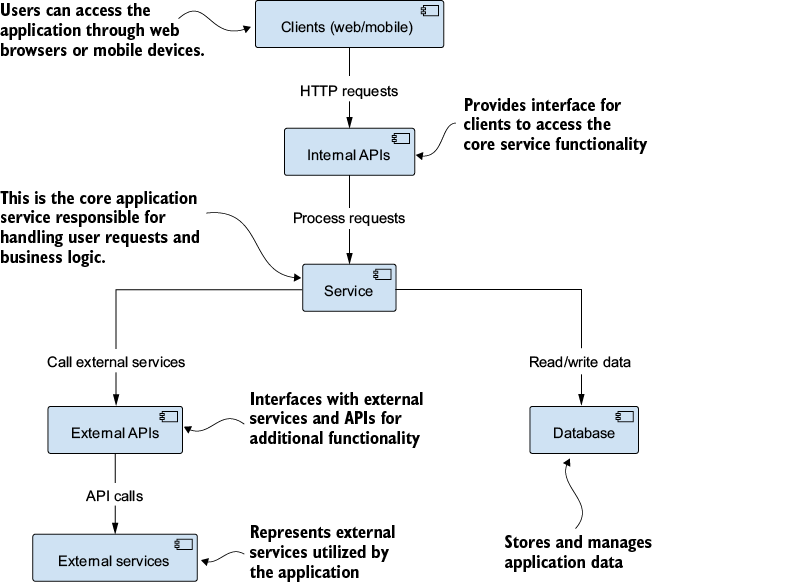
The architecture diagram separates clients, application logic, data storage, and external services. It is a useful starting point for deciding where a feature belongs. section 1.2.2
In an AI-powered application, the interface collects user input and sends it to the backend. The backend processes the request, supplies context to a suitable model, checks the response, and returns it for display. The user can then ask a follow-up question or provide feedback. The model is only one part of the system: the interface, data processing, API integration, and deployment also have to work together. section 2.2.1 section 1.7
Interactive chat
A user enters a question and presses Enter. The web UI submits it to the backend, which sends the question and context to an AI model. After the backend verifies the reply, the UI adds it to a scrollable conversation history. The same flow supports follow-up questions. section 2.2.1
For a JavaScript implementation, React can provide interface components while Next.js and the Vercel AI SDK support backend integration with external AI providers. More complete applications add features around the conversation: an interview assistant uses authentication, interview settings, and session history; a retrieval-augmented generation (RAG) application lets users manage document-based knowledge bases and question them through chat. section 1.7 section 10.1.1 section 11.1
Production deployment makes the application available at a public URL and requires configuring everything it depends on. That can include production databases, authentication, and rate limiting, with scalability and security in mind. Vercel offers a streamlined path for Next.js applications; Docker and Kubernetes are options for more advanced deployment needs. section 9.6.1







