A web service lets another application use functionality over HTTP. It exposes endpoints—URLs that clients can request to access or change server-side data. An HTTP API typically returns JSON rather than a finished HTML page: the client decides how to use or display the data. section 5.1
A browser-based single-page application might fetch JSON and build its own interface. A mobile app can use the same approach. Other backend services can also call endpoints; for example, an email service could accept an address and message from another application. “HTTP API” is the generic term here; “Web API” can also name a specific ASP.NET Core approach. section 5.1 section 3.2
Figure 5.2 A sample client-side SPA using Blazor WebAssembly. The initial requests load the SPA files into the browser, and subsequent requests fetch data from a web API, formatted as JSON.
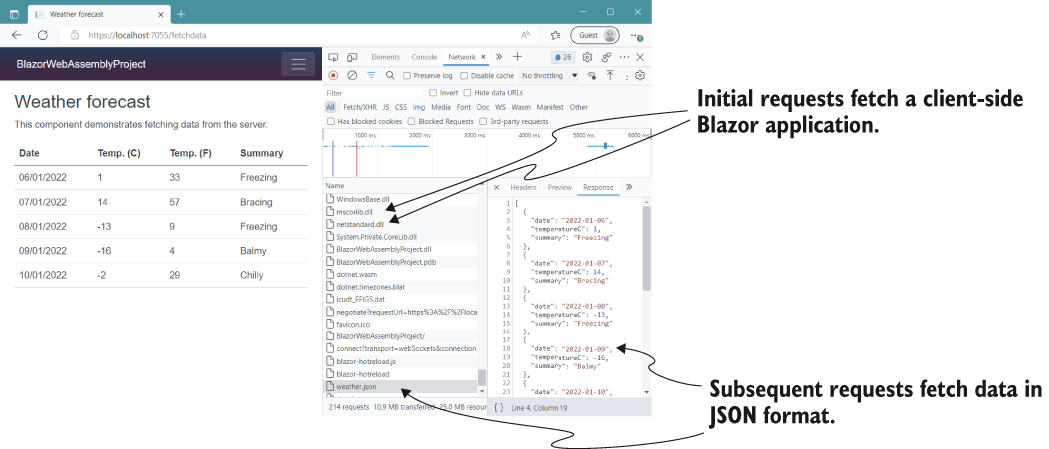
The figure separates the initial download of a single-page application from its later requests for JSON data. Those later requests show where the API fits. section 5.1
In ASP.NET Core, minimal APIs are a simple way to build this kind of service. Web API applications offer another approach with more features and structure, with some cost to performance and convenience. Razor Pages and MVC instead commonly generate HTML on the server for direct viewing in a browser. section 3.2 section 1.2
To start a local ASP.NET Core API application:
- Generate a project from a template. section 3.2
- Restore dependencies, build the project, then run it. section 3.2
A service may also be a *client* of another web service. An e-commerce application, for instance, might call specialist services to send email or take payments. In C#, HttpClient makes outgoing requests, but creating and disposing of one for every request can cause socket exhaustion. Keeping one instance avoids that problem but can miss DNS changes, so client lifetime needs care. section 33.1





