A web API is an HTTP-based service that lets software access and sometimes change data. Clients use its endpoints rather than needing to know how the underlying database works. Requests and responses follow shared rules and use formats such as JSON or XML. “Web API” can mean either the interface or the application that provides it. section 1.1 section 1.3
One API for a board-game catalog
A board-game API can serve a public website and mobile app that browse games and manage lists. It can also serve an authorized management portal that adds, updates, and deletes games, plus an analysis service that periodically pulls data. These clients share the API without receiving direct access to the database server or its data model. section 1.1.2
Figure 1.3 Several board-game-related web applications and services fed by a single MyBGList web API
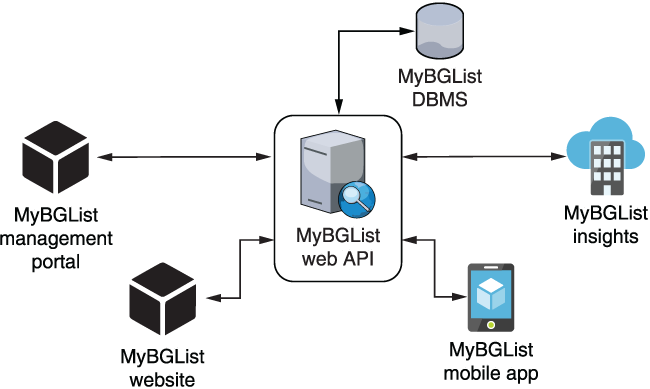
The architecture diagram shows the board-game API between its database and the website, mobile app, management portal, and analysis service. section 1.1.2
Decide who may call the service before designing access. A public API is available broadly; a partner API is limited to selected external parties; an internal API stays within an organization; and a composite API coordinates calls to other APIs. Architectural choices also matter: REST, SOAP, gRPC, and GraphQL have different rules and trade-offs. The implementation here concentrates on HTTP APIs, chiefly REST, rather than message-based protocols such as AMQP. section 1.1.3 section 1.3
A practical ASP.NET Core starting path is:
- Install the .NET SDK and Visual Studio 2022, then create an ASP.NET Core web API project with the web API template and select .NET 6. Run it in Debug mode to check that the generated application starts. section 2.3
- Inspect Program.cs for application setup, the configuration files for settings, and the generated controller and data-transfer object for a small JSON-response example. Replace the sample weather-forecast classes with classes for the data the service will provide. section 2.4
- For controller-based endpoints, inherit from ControllerBase when returning data rather than HTML views. Attributes such as [Route], [HttpGet], and [HttpDelete] connect URL paths and HTTP methods to actions; app.MapControllers() enables their mapping. section 1.2.3
Making an endpoint work is not the end of the job. Document its inputs, responses, examples, and authorization requirements so other developers can use it; Swagger/OpenAPI with Swashbuckle supports this in ASP.NET Core. Before publishing, prepare the application for release and consider security. A project that is technically ready to show testers is not automatically ready to deliver to customers. section 11.5 section 12.0





