In a survivor game, enemy speed is a rule to tune; an enemy’s current position is gameplay state. Keep those concerns separate. Balance data holds designer-set rules and values that gameplay logic does not modify during a session. GameData holds changing state, such as enemy positions and elapsed time. section 4.1 section 4.2
Listing 4.1 Our balance data class
[Serializable]
public class Balance
{
   public int NumEnemies;
    public float EnemyVelocity;
    public float EnemyRadius;
    public float SpawnRadius;
    public float PlayerVelocity;
    public float MinCollisionDistance;
}
A small serializable Balance class holds the survivor game’s enemy count, speeds, radii, and collision threshold. Designers can enter these values in the Unity Editor. section 4.2
Store a value once when every entity shares it. One EnemyVelocity and one EnemyRadius in Balance avoid separate per-enemy arrays in GameData. NumEnemies determines the size of the enemy-position array and the object pool. A class passes a reference to the same long-lived Balance object rather than copying its expanding set of fields. section 4.2 section 4.4.2
Figure 4.5 The complete architecture of our survivor game. The Balance data is created at tool time and is loaded by Game. GameData is only modified by Logic. Both Board and Game can directly call the logic functions, which take data in, transform it, and output data back.
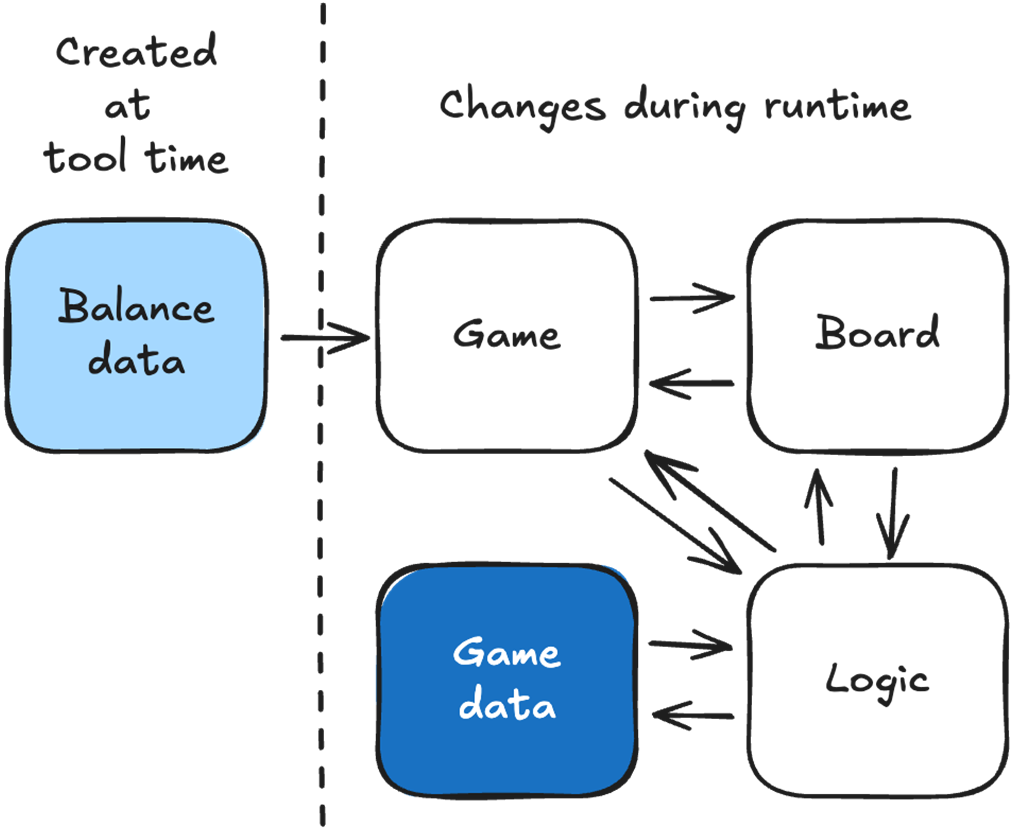
The architecture separates ownership: Game loads Balance; Logic uses it to modify GameData; Game and Board use the resulting data to drive and display play. section 4.1
Editing Balance on the Game object in the Unity Editor works for a small example. For a larger workflow, keep designer-editable values in an external asset, validate and parse them at tool time, then load the resulting binary data at runtime. Google Sheets and ScriptableObjects are options; choose according to the team’s needs. Tool-time checks, such as requiring a positive value, can remove the corresponding runtime check. section 9.0 section 9.7
Treat balance versions as part of gameplay diagnosis:
- Record which version a player used. A changed rule can explain behavior or a bug that appears only for that version. section 9.3
- Keep older versions when live-updating, and use separate balance files when testing different settings with player groups. section 9.8
Rules versus state
In chess, how pieces may move belongs in Balance; their positions belong in GameData. The same distinction puts survivor-game movement settings in Balance and current enemy positions in GameData. section 9.3 section 4.1
