A Zettelkasten, or “slip box,” is a personal system of interconnected notes for gathering, retaining, and connecting knowledge. Rather than treating note-taking as storage alone, it turns writing into an ongoing exercise in reflection and idea-making. section 2.0
The classic form used index cards: each Zettel held one idea, with identifiers that allowed both a linear sequence and branches of related thought. Keyword index cards pointed toward larger themes, so following links could help reconstruct an idea. section 2.4.2
A practical Zettelkasten habit can be kept simple:
- Capture one idea or thought per note, like applying separation of concerns to knowledge. section 2.4.2
- Link a note to related notes instead of relying only on its place in a sequence. section 2.4.2
- Maintain keywords or search paths that lead from broad themes to specific notes. section 2.4.2
- Revisit captured notes so that reminders do not become an unattended pile of chores. section 2.4.2
From card IDs to digital links
A card numbered 32 might be followed by 33 for a new sequence, while 32a adds related material to the earlier note. Digital systems such as Obsidian and Zettlr can replace physical drawers with filenames, references, and fuzzy search. section 2.4.2
Figure 2.6 An example of the linking capabilities of Luhmann’s method. Zettel 1,5A2b, as seen in https://niklas-luhmann-archiv.de/bestand/zettelkasten/zettel/ZK_1_NB_1-5A2b_V.
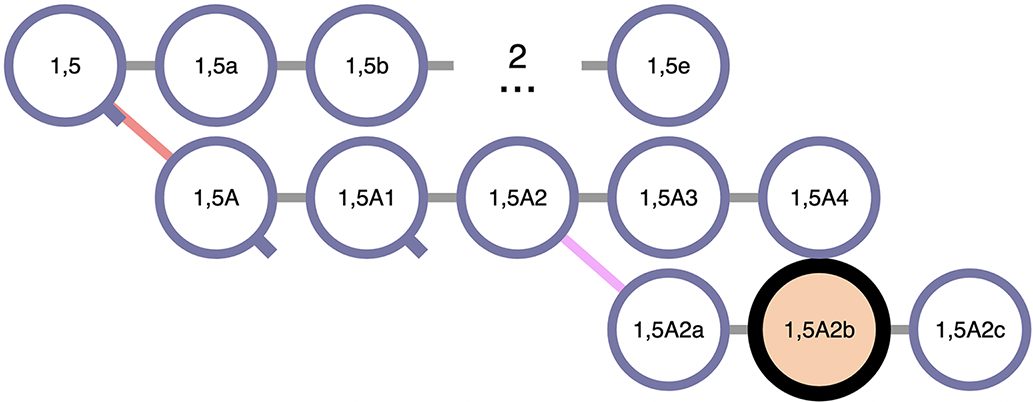
See how an identifier can encode a trail of related notes rather than a simple filing order. section 2.4.2