An access control list (ACL) is an ordered set of permit and deny rules. On Cisco IOS, it can restrict which hosts connect to VTY lines or identify addresses for translation by NAT. section 5.2.2 section 9.3.2
Apply ACLs according to the operation they support:
- Create a numbered ACL with a network address and wildcard mask, such as access-list 1 permit 192.168.1.0 0.0.0.255. section 5.2.2
- Apply a VTY access ACL with access-class 1 in; this limits incoming Telnet or SSH connections to permitted source hosts. section 5.2.2 section 5.3.2
- Use an ACL with dynamic NAT to select inside local addresses for translation; map it to a NAT pool rather than using it to block forwarding. section 9.3.2
- Remember the implicit deny: addresses outside a permitted range are not selected by the ACL. In dynamic NAT, denied packets are forwarded unchanged, while matching packets without an available pool address are dropped. section 9.3.2
Restricting SSH and configuring dynamic NAT
For SSH, create access-list 1 permit 192.168.1.0 0.0.0.255, select line vty 0 15, and apply access-class 1 in. For dynamic NAT, mark interfaces inside and outside, create access-list 1 permit 10.0.0.0 0.0.0.255, define a NAT pool, and issue ip nat inside source list 1 pool POOL1. section 5.3.2 section 9.3.2
Figure 5.6 Enabling SSHv2 on SW1. Users must log in with a local user account and will be logged out after 20 minutes of inactivity. Only SSH can be used to connect to the VTY lines, and only hosts in 192.168.1.0/24 are permitted.
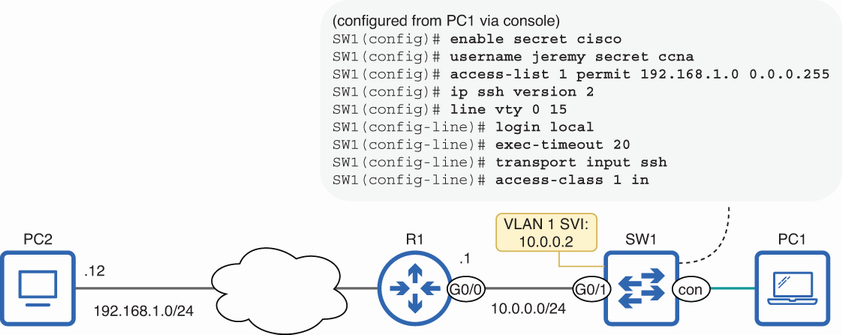
Shows an SSHv2 configuration in which only hosts from 192.168.1.0/24 can connect to the VTY lines. section 5.3.2
Figure 9.8 Dynamic NAT. An ACL is used to identify a range of inside local addresses, and a NAT pool is used to identify a range of inside global addresses. Addresses in the pool are assigned on a first come, first served basis.
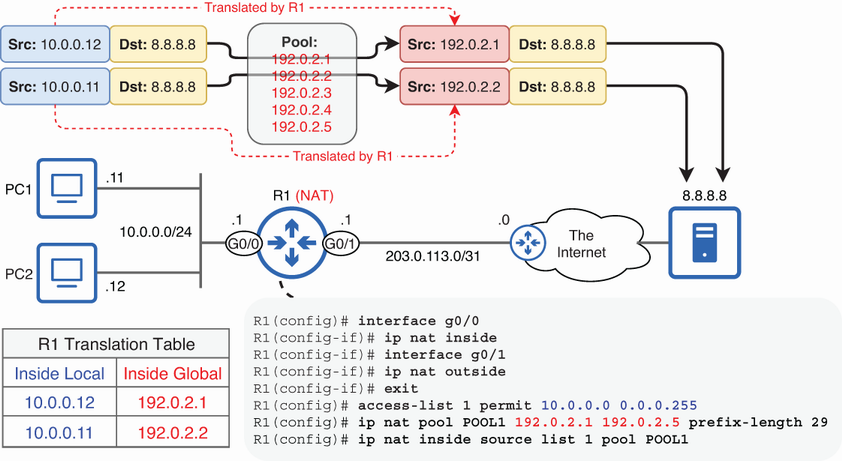
Shows an ACL identifying inside local addresses for dynamic NAT and a pool supplying inside global addresses. section 9.3.2







