An access control list (ACL) is an ordered set of rules that filters packets at a router interface. A standard ACL matches packets primarily by source IPv4 address and permits or denies them. section 23.0 section 23.4
Understand ACL behavior in this order:
- Process access control entries (ACEs) from top to bottom; stop at the first matching rule. section 23.1 section 23.4
- Permit matching packets for forwarding and discard denied packets. section 23.1
- Apply an implicit deny when no explicit ACE matches, so a final permit rule is important when other traffic should pass. section 23.4
- Apply the ACL to an interface before it affects traffic; inbound evaluates packets entering, while outbound evaluates packets leaving. section 23.1.3 section 23.4
- Place the ACL where the desired traffic actually enters or exits; an incorrectly directed ACL can be ineffective. section 23.1.3
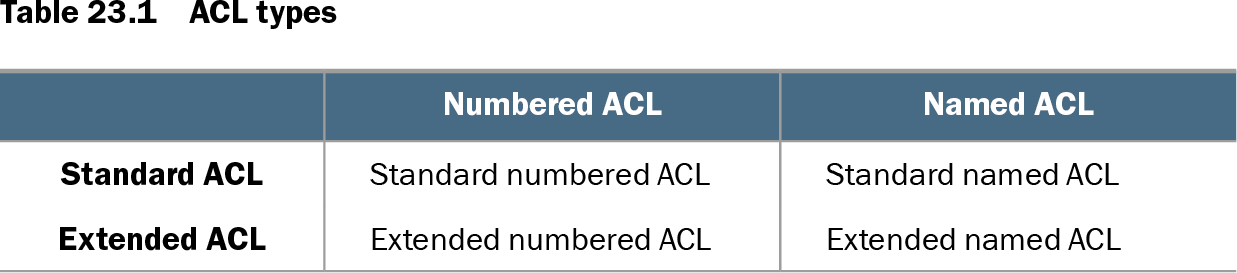
Standard ACLs match only source IP addresses. They may be numbered or named: standard numbered ACLs use ranges 1–99 or 1300–1999, while named ACLs use descriptive identifiers. Configure ACEs in order, using wildcard masks for address matching, then apply the ACL with ip access-group. section 23.1.4 section 23.2.1 section 23.2.2
Blocking a department from a server LAN
To prevent accounting hosts in 192.168.2.0/24 from reaching Server LAN B, create a standard numbered ACL and apply it outbound on R2 G0/1: R2(config)# access-list 10 deny 192.168.2.0 0.0.0.255 R2(config)# access-list 10 permit any R2(config)# interface g0/1 R2(config-if)# ip access-group 10 out The first ACE blocks accounting traffic; permit any allows other sources. Verify the configuration with show access-lists or interface output. section 23.3
Figure 23.4 An outbound ACL on G0/2 filters packets as they exit the interface. Packet 1 from 192.168.1.2 is denied by ACE 1. Packet 2 from 192.168.2.99 is permitted by ACE 2. Packet 3 from 192.168.3.10 isn’t evaluated against the ACL because the packet enters G0/2; the ACL is applied outbound, not inbound.
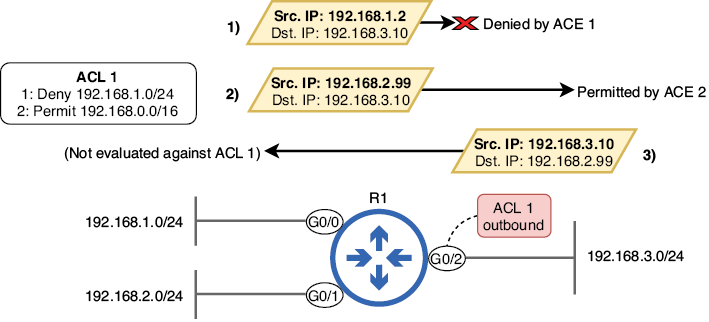
Trace which packets an outbound ACL evaluates and which packets bypass it because they enter the interface. section 23.1.3
Table 23.1 ACL types (view table figure)
| Numbered ACL |
Named ACL |
|
|---|---|---|
| Standard ACL |
Standard numbered ACL |
Standard named ACL |
| Extended ACL |
Extended numbered ACL |
Extended named ACL |
Compare standard and extended ACLs with numbered and named identification to distinguish the four CCNA-relevant combinations. section 23.1.4