Accessibility makes a data visualization usable by people with varying abilities. The goal is an equivalent experience: people should reach the chart’s main conclusions and, when useful, its underlying data, even if they do not use the visualization in the same way. Build for accessibility during development; it is easier than retrofitting and often improves the experience for everyone. section 10.0 section 10.2
Use WCAG’s four directions as a practical frame: make content perceivable, operable, understandable, and robust. For charts, that means clear text alternatives and contrast; keyboard-operable controls; readable, predictable instructions; and markup that browsers and assistive technologies can interpret. Chartability turns these ideas into testable checks for visualization projects. section 10.2
Start an accessible chart by checking the information surrounding and encoded within it:
- Explain the chart’s purpose, what marks represent, and how position, size, color, controls, legends, and axes should be read. section 10.2.1
- Keep text easy to read, target a grade-9 reading level or lower, define necessary complex terms, and ensure text remains legible on small screens. section 10.2.1
- Provide sufficient color contrast and do not communicate information with color alone. section 10.2
- Keep visual density appropriate, so the data can be read without overwhelming users. section 10.2
Make a scatterplot understandable before interaction
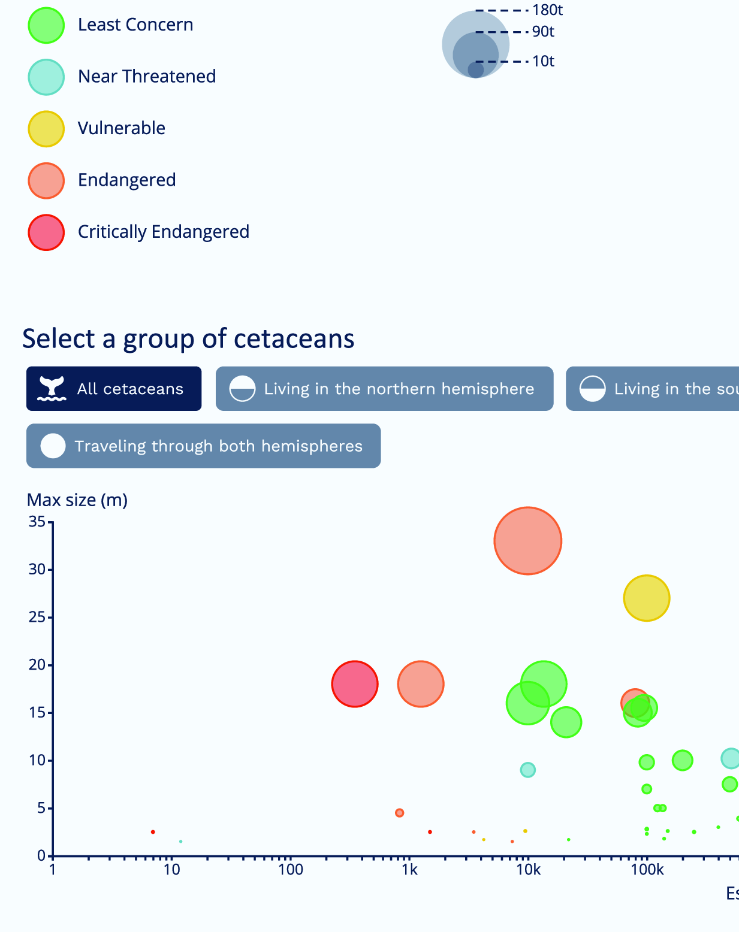
A cetacean scatterplot introduces its topic, identifies circles as species, and explains that position, area, and color encode data. Labels explain the filter buttons, while axes and legends support interpretation. Simplifying difficult introductory sentences lowers the reading level; resizing axis text with screen width prevents it from becoming tiny on phones. section 10.2.1
Give screen reader users a meaningful page structure. Use semantic layout elements such as header, main, section, and footer. Group related controls in lists, use real button elements, and expose selected filter state with aria-pressed. These choices let users hear both the page layout and the presence and state of a collection of controls. section 10.2.3
Treat an SVG chart as an image that needs context. Add role="img", connect aria-labelledby to SVG title and desc elements, and write a description that communicates the important information rather than forcing users through every axis tick. Make interactive SVG shapes reachable with Tab through tabindex, and support focus and blur alongside pointer interactions. section 10.2.3 section 10.3
Figure 10.1 Scatterplot of the cetacean population, size, and weight built in chapter 7. In this chapter, we’ll improve its accessibility.
Use the checklist to review a D3 visualization across text, visual encodings, screen readers, interactions, and responsive behavior. section 10.2
Offer the underlying data as an alternative, such as a data table with a caption and CSV download. A control can switch between chart and table while updating aria-pressed, giving users a direct way to inspect the same information without relying on the graphic. section 10.2.3
Accessibility also includes device and user preferences. Keep the experience equivalent across screen sizes, adapt layouts and chart readability for smaller displays, and avoid inline styles for general page typography or colors because they can override user stylesheets. Avoid red flashes, red animation, and large red areas that could create a seizure risk. section 10.2.5 section 10.3





