Accessibility is the practice of making content and interfaces perceivable, operable, understandable, and robust for people with disabilities and varied access technologies. WCAG 2.1 organizes these principles into guidelines, success criteria, and three conformance levels: A, AA, and AAA. section 4.4.2
Good accessibility is not only about disability categories. It also helps people using screen readers, mobile devices, or changing vision. Typography and color choices can make reading easier—or make users reach for the metaphorical magnifying glass. section 4.4.2 section 5.5
Practical accessibility decisions include:
- Use WCAG 2.1 as a reference, treating Level A as the minimum, Level AA as the broader recommendation, and Level AAA as especially strict rather than a universal site requirement. section 4.4.2
- Check whether color choices provide enough contrast, and avoid making color the only way users perceive important information. section 4.4.2
- Choose typography inclusively, considering aging eyesight and vision or neurological impairments rather than designing only for ideal eyesight. section 5.5
- When a preferred design cannot meet a guideline, provide an accessible alternative, such as a switch to a compliant color palette. section 4.4.2
A border makes the difference
Blue bars on a light-gray background have a contrast ratio of 1.93:1, below WCAG AA’s 3:1 example threshold. Adding a dark-gray border raises the relevant contrast to 8.7:1, making the bars easier to distinguish. section 4.4.2
Figure 4.34 On the left, the blue bars have no border, so the contrast is calculated between the blue and the light gray as 1.93:1, which is too low to pass WCAG’s AA level of 3:1. However, if you add a dark-gray border, the contrast is then calculated using the border against the background, which shows up better than just the plain blue bars. The contrast between the darker gray border and the lighter gray background is a whopping 8.7:1, beating out the AA level by almost a factor of two.
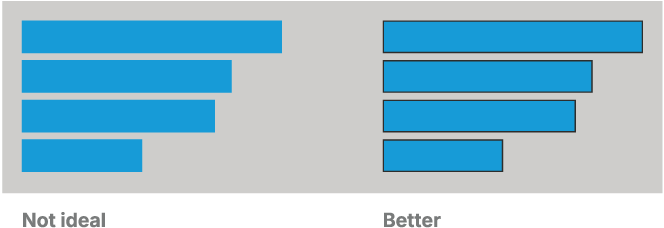
Inspect the contrast comparison showing how a dark border changes the accessibility of blue bars against a light-gray background. section 4.4.2





