An adapter keeps application logic separate from a concrete way of accessing data or infrastructure. A React component can call a consistent data interface instead of depending directly on REST, GraphQL, or a mock. In Hexagonal Architecture, adapters connect external interfaces to ports around the core domain. section 5.2 section 6.1
In an architecture interview, clarify which side of the boundary an adapter serves:
- A driving adapter handles input from a web UI, CLI, or API and invokes an inbound port. section 6.1
- A driven adapter implements an outbound port for a database, external authentication service, or notification service. section 6.1
- A frontend data adapter gives components one interface while the underlying source can change or be mocked. section 5.2
Refactoring user management
Suppose user-management logic directly handles SQL, HTTP, and JWT concerns. Move user entities and services into a core without those dependencies. Define inbound ports for registration, authentication, and updates; define outbound ports for persistence, authentication, and notifications. UI and API adapters call the inbound ports, while infrastructure adapters implement the outbound ones. This makes the core easier to test and lets external technologies change without rewriting domain logic. section 6.1
Listing 5.12 Data accessing using the Adapter pattern
export const userAdapter = {
  getUser: async (id) => fetch(`/api/users/${id}`).then(res => res.json()),
  updateUser: async (id, data) => axios.put(`/api/users/${id}`, data),
};
The small user adapter illustrates a consistent frontend access point for getting and updating users; its methods hide the component’s direct use of fetch and axios. section 5.2
Figure 6.5 Hexagonal Architecture of the user management domain.
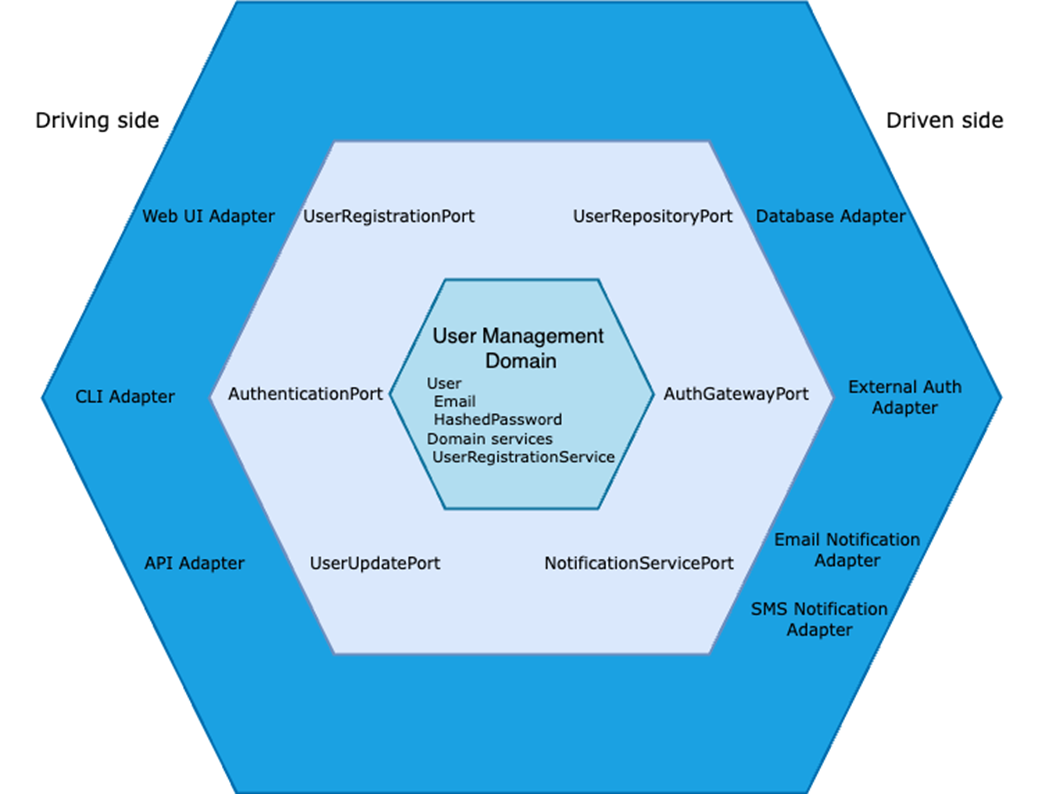
The diagram places driving and driven adapters on opposite sides of the user-management core, making their relationships to inbound and outbound ports visible. section 6.1