Agentic development uses an AI agent inside a code repository to navigate files, change code, and run development tools. A single prompt can trigger multiple tool calls, from searching the codebase to building the application and running tests. section 5.1
The approach shifts effort toward task design and review. Give the agent more autonomy for clearly specified work that is easy to acceptance-test; direct it more closely when decisions need your input. Treat its code and tests as work to verify, not as automatically correct. section 5.0 section 5.12
A practical workflow includes:
- Run the agent in the repository so it can inspect source files, tests, build scripts, and documentation. section 5.1
- Set permissions deliberately: the agent may access files and run tools, and there is no sandbox as a physical backstop. section 5.12
- Build confidence by reviewing the changes and checking the results of builds and tests. section 5.1 section 5.12
Investigating a deployment
When examining a Kubernetes deployment YAML file, an agent can propose running a kubectl command to compare the configuration with the live deployment. section 5.1
Figure 5.1 Claude Code runs inside your repository with no sandbox. The permissions model asks your consent to access files and run tools, but there is no physical backstop to prevent unwanted behavior.
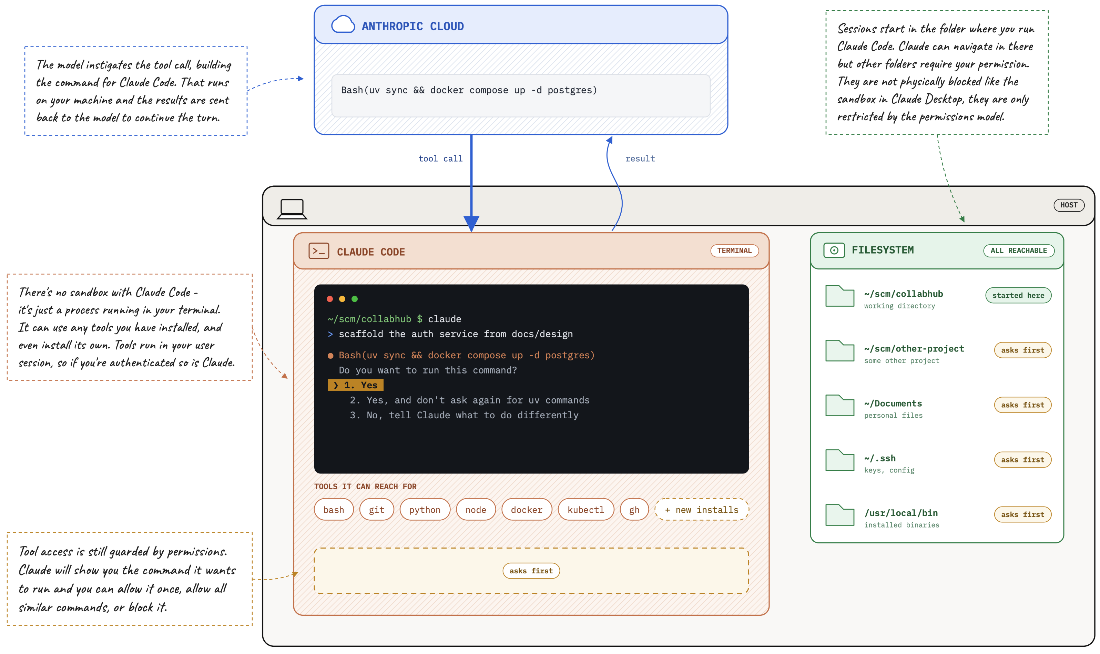
Use the figure to understand the repository access and permission risks: consent checks do not provide a physical sandbox. section 5.1


