AI-Toolkit is open-source software for training Flux LoRAs: small adaptations that teach a model a custom subject or style without retraining everything. Its browser UI handles the practical loop—organize a dataset, configure a job, run training, and inspect results. Expect a hungry GPU: Flux LoRA training requires 24 GB of VRAM in this workflow. section 13.0 section 13.1
Figure 13.2 The AI-Toolkit as it appears in the browser.
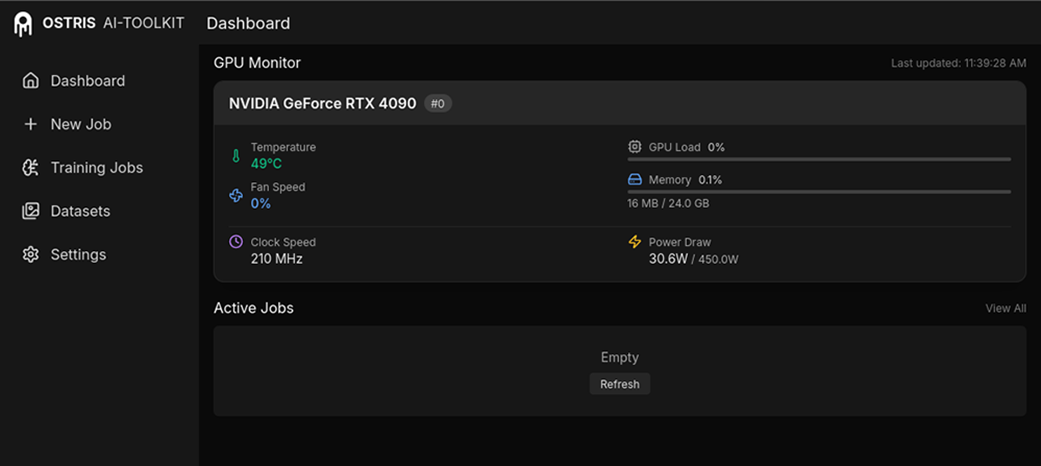
The browser interface is the control room for datasets, training jobs, and training results. section 13.1
A basic run looks like this:
- Clone and install the project, then run npm run build_and_start from its ui directory. Open the local server address in a browser. section 13.1
- Prepare high-quality images of the subject across poses and environments, then caption them descriptively. Careful labeling is tedious but central to the result. section 13.6
- Create a job, give the LoRA a meaningful name and trigger word, select Flux.1, and choose the correct dataset. Most remaining settings can initially stay at their defaults. section 13.3
- Save checkpoints throughout training and compare sample-prompt images. Prefer the earliest checkpoint that represents the subject correctly before overtraining distorts other subjects. section 13.3 section 13.6
Training a custom dog LoRA
A distinctive dog can make training results easier to judge: use varied photos, captions that describe each image, and sample prompts that test the dog in several scenarios. The winning checkpoint is not automatically the final one; it is the earliest version that captures the subject without unwanted distortions. section 13.0 section 13.6
