Async/await is a C# language feature for expressing asynchronous operations with synchronous-looking control flow. It helps keep desktop interfaces responsive and lets servers handle many I/O-bound connections without blocking a thread while waiting for files or network data. section 1.0 section 1.3
Marking a method async enables compiler transformation; it does not create a background thread. Each await can suspend the current execution chunk, return control to the caller, and resume the method through a continuation when its Task completes. Task represents future completion, while Task<T> represents a future value. section 3.3 section 3.7
Reading a BMP image width
An asynchronous method can retain the logical sequence of opening a file, validating its “BM” signature, seeking to byte 18, reading four bytes, and returning the width: `public async Task<int> GetBitmapWidth(string path) { using (var file = new FileStream(path, FileMode.Open, FileAccess.Read)) { var fileId = new byte[2]; var read = await file.ReadAsync(fileId, 0, 2); if (read != 2 || fileId[0] != 'B' || fileId[1] != 'M') throw new Exception("Not a BMP file"); file.Seek(18, SeekOrigin.Begin); var widthBuffer = new byte[4]; read = await file.ReadAsync(widthBuffer, 0, 4); if (read != 4) throw new Exception("Not a BMP file"); return BitConverter.ToInt32(widthBuffer, 0); } }`. section 3.1 section 3.3
Use async/await deliberately rather than treating it as automatically faster or universally appropriate.
- Use it for many simultaneous connections, async-only APIs, I/O-heavy request processing, or long-running work that would freeze a native UI. section 6.4
- Make callers asynchronous when they must await asynchronous operations; blocking with Wait or Result can remove the benefits and cause bugs or deadlocks. section 6.3.1 section 3.7
- Preserve every returned Task, because ignoring it can lose exceptions; avoid async void except where an event handler requires it, and never let exceptions escape async void. section 12.5
- Avoid it for code that performs only one simultaneous operation when asynchronous overhead and added failure modes outweigh the benefit. section 6.3.4 section 6.5
Figure 1.4 Single-threaded asynchronous web server with three web requests
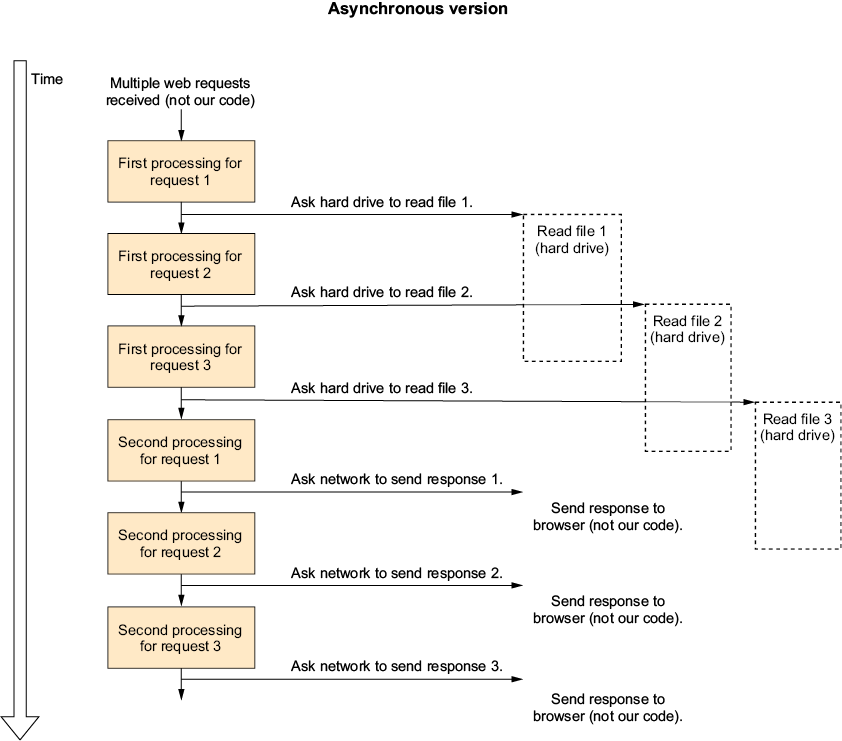
Compare three simultaneous web requests in a single-threaded asynchronous server, where execution divides around I/O and avoids retaining a thread during waits. section 1.3
















