When an email arrives with a photo, how does that photo get into storage without someone copying it by hand? Azure Logic Apps can handle the handoff. A Logic App is a managed workflow that starts when an event occurs, then uses connected steps to move and manipulate data across Azure and third-party services. Its visual designer lets you build a multi-step workflow without writing code. section 2.2 section 2.2.8
A workflow has one trigger—the event that starts it—and one or more actions that do the work. Connectors link steps to services such as Outlook, Azure Blob Storage, and X. The designer also offers conditions, comparisons, and loops. Unlike an Azure Function, which supplies code for a single-purpose process, a Logic App coordinates steps between services; the two can work together. section 2.2 section 2.5 section 8.6
To collect emailed images in Blob Storage through the Azure portal:
- Create a Logic App, supplying its subscription, resource group, name, and region. Choose a hosting plan before building the workflow. section 2.2.9
- Open Logic App Designer, add the Office 365 Outlook “When a new email arrives” trigger, and authorize the email connection. Set Folder to Inbox and both Only With Attachments and Include Attachments to Yes. section 2.2.10 section 2.2.11
- Add the Create Block Blob action, connect it to the storage account, choose a container, and map attachment data from the email step into the blob fields. Selecting the attachments collection makes the designer add a For Each loop, so an email can supply more than one file. section 2.2.12
- Save the workflow and send an image attachment to the connected inbox. Check the run for success or failure, then confirm the file appears in Blob Storage. The Logic App keeps running until disabled or deleted. section 2.2.13
Figure 2.29 The operation changes to a For Each when choosing a collection of input, such as attachments.
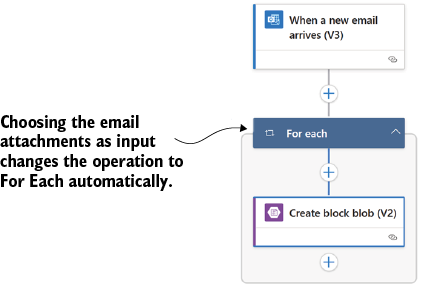
The designer’s For Each step shows how selecting a collection of email attachments turns one storage action into an action repeated for each attachment. section 2.2.12
A different handoff: blob to post
The same pattern can start with a newly inserted blob instead of an email. A workflow can retrieve the blob’s content, then pass that content into an X “Post a Tweet” action alongside tweet text. The X connection needs authentication and permission to post on the account’s behalf. Dynamic fields carry values from an earlier step into a later one—that data handoff is the useful part, not the tweet itself. section 8.3.3 section 8.6
Hosting and permissions still deserve a decision. Consumption charges for usage such as executions and connectors; Standard offers dedicated-capacity options and stateful or stateless workflows, but those options need a closer look before selection. Azure handles scaling without requiring you to provision virtual machines, though request, throughput, and concurrency limits still apply. Connections must be authorized, and a successful run should be checked against the destination data—not just celebrated in the run history. section 2.2.9 section 2.3.1 section 2.2.13

