A check-in is a short opening activity before collaborative work begins. It shifts attention briefly from the session goal to the people present: who they are, why they came, what they expect, and how ready they feel to engage. Done well, it creates a clear start, builds personal connection, and orients the group toward the work ahead. section 4.1.2 section 4.4.1
Check-ins are sensemaking with a specific purpose and time: making emotions, energy, expectations, discomfort, and potentially difficult group dynamics visible early. Those signals help a facilitator decide where to pay attention, what to explore further, and whether the planned course needs adjustment. Skipping the activity can leave people uncertain about the purpose, participants, or expectations and can make later collaboration harder. section 4.4 section 4.4.3
Prepare and lead a check-in as a contained sharing activity:
- Tailor questions to the meeting’s goal, context, and social dynamics; ask about experience, questions, expectations, or readiness rather than soliciting content opinions. section 4.4.1
- Make participation safe: participants may pass, and no one should be forced to disclose more than they wish. section 4.4.1
- Use monologue rather than conversation while each person shares; do not interrupt. section 4.4.2
- Let people speak in popcorn style rather than calling on them in sequence; the facilitator starts to model the practice. section 4.4.2 section 5.4.3
- Listen for recurring themes and significant signals, summarize what was heard, ask what was missed, then invite reactions before moving on. section 4.4.2 section 5.4.3
Opening a cross-functional modeling session
Start by sharing a brief, appropriately personal response yourself. Invite each participant to say their name if needed and answer only what feels comfortable: What brings you here? What would make today useful? What do you already know or wonder about the topic? Let silence make room for volunteers. After everyone has spoken or passed, summarize common expectations and uncertainties, check the summary with the group, and carry important themes into the modeling work. section 4.4.1 section 5.4.3
A check-in is not a substitute for resolving every conflict at the start. Its value is in bringing important signals into view soon enough to manage them. Participants can also help when no check-in occurs: describe their own hesitation or unmet need, ask whether others share it, and support progress without taking over the facilitator’s role. section 4.4.3 section 5.4.6
Figure 4.12 Example check-in we used at BigScreen. We start with a personal question to create more group understanding. Questions 3 and 4 focus on the session’s content, ensuring participants engage and reflect on the topic at hand. Our goal is to avoid opinions on the content and instead delve into what participants know and their questions. Remember to customize your check-in questions for each session and refresh the format regularly to keep it genuine.
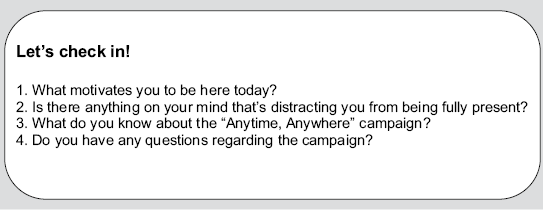
Use this question pattern to balance personal connection with content readiness. Adapt the prompts each time so the activity remains relevant and genuine. section 4.4.1
