A shell script is a text-based automation that an interpreter executes to perform a repeatable operational task. Treat it as a reusable building block rather than a one-off command sequence: identify the job, define its inputs, separate its phases, and make it safe to run again as requirements change. section 2.0 section 2.1
Start from the operational requirement. A log-retention automation, for example, needs to find eligible files, archive them, and remove the archived originals without violating retention needs. Turn the required folder paths, archive name, and age threshold into parameters. Validate risky inputs instead of expecting callers to understand implementation details such as negative date offsets. section 2.1
Figure 2.1 Design the first phase of the file cleanup automation by defining the required parameters and the steps to perform, such as getting the files to archive, performing the archive, and then cleaning up the archived files.
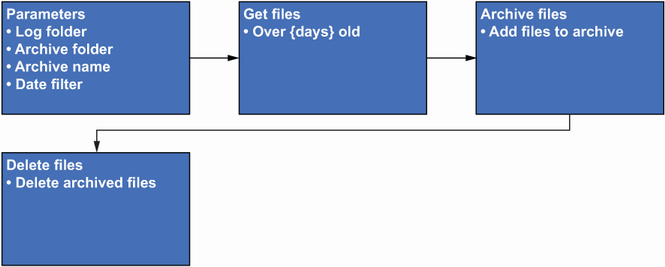
Use the phase diagram to map inputs and the ordered work before writing commands: select files, create the archive, then clean up. section 2.1
Structure maintainable scripts around clear responsibilities:
- Keep control logic in the main script: decide whether a resource exists, whether it is running, and which action follows. section 10.6.1
- Put related, restartable work in stand-alone functions, such as creating a virtual machine or applying settings. section 10.6.1
- Split work into separate scripts when it may run independently; keep always-together steps together as functions. section 10.1.1
- Avoid nesting functions merely to hide execution decisions, because it complicates maintenance and troubleshooting. section 10.6.1
Figure 10.6 Virtual machine creation organized with functions and checks. The first check that confirms whether the virtual machine exists is performed in the script. If it doesn’t exist, a function is called to perform the creation process. Once it is confirmed that it exists or has been created, a running check will tell you whether you can set the configuration or not. Finally, if the configuration is performed, you know it is not running, so turn it on—but outside the function, in case you need to perform additional configuration later.
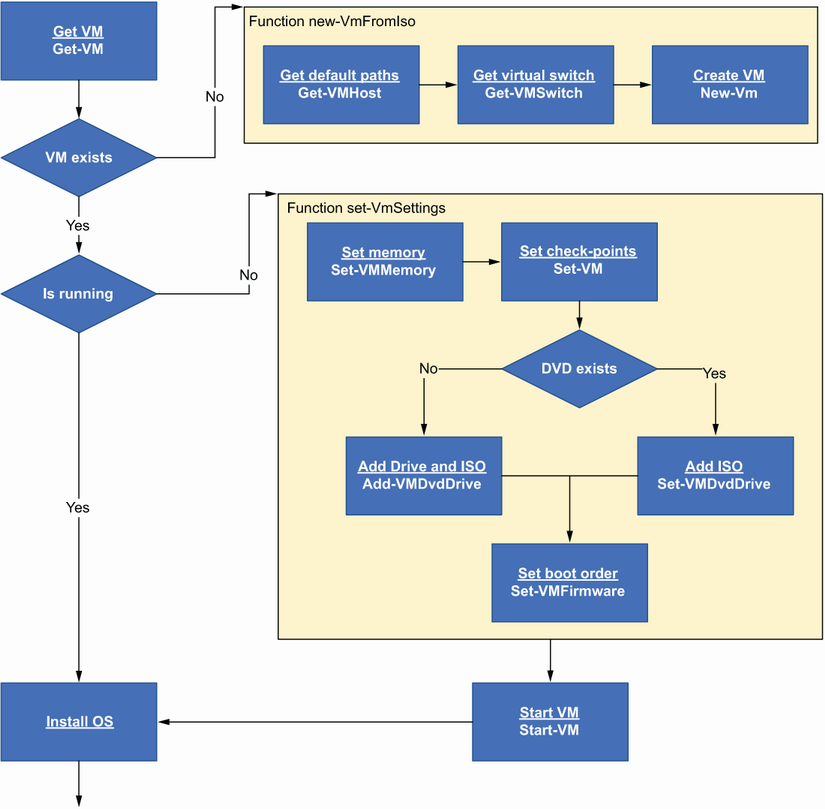
The flow separates checks and sequencing in the main script from the functions that create and configure the virtual machine. section 10.6.1
Scheduling changes a script from an interactive tool into unattended automation. Place the file where the scheduler can access it, satisfy dependencies, grant required permissions, and select a scheduler appropriate to the environment. A scheduled task may collect inventory, check accounts or resources, or run backups; it need not be real-time. section 3.1 section 3.2
Execution location is part of script design. A script that reaches cloud services needs viable network access, while a script that operates an installed connector must run on the server hosting that connector. Cross-system work can also fail when replication delays prevent a newly created directory account from being visible to a later mailbox-creation step. section 3.1.2
For long-running or event-oriented automation, plan behavior explicitly. A watcher should monitor for events and hand work to an action script. Know the expected runtime and provide graceful termination when a script exceeds it, rather than allowing overlapping or stalled executions. section 3.5
Distributing a team installation script
An installation script can make a shared PowerShell module available without manually copying files: test for Git, install it through an environment-supported package manager when absent, clone the repository, and create a symbolic link under a PSModulePath folder. The link lets PowerShell recognize the module while the repository remains in a convenient local location. section 12.2.3
Client-device scripts deserve additional restraint. Remote PowerShell is disabled by default on Windows 10 and 11, and enabling it on client devices is discouraged. Use a systems-management solution for deployment, then test through that same delivery path, where enrollment, groups, and device state can affect results. section 11.4
Share useful scripts so repeated support work does not become duplicated effort. Individual scripts can be shared through GitHub Gist, while a module provides a team-facing collection of reusable tools that can be stored and managed in a GitHub repository. section 12.0





