A bit is one memory value that is either off (0) or on (1). On an 8-bit NES, eight bits are grouped into an addressable byte. A byte has 256 possible arrangements, so it can hold a number from 0 to 255. Bits in a byte are numbered from 0 at the rightmost position through 7 at the leftmost position. section 3.2 section 4.5
Bits make compact game data possible. A byte may describe pixels that are on or off in a tile pattern, an X or Y sprite coordinate, or several independent flags. Bits 0–3 form the low nibble and bits 4–7 form the high nibble; each nibble represents values 0–15, written 0–F in hexadecimal. section 4.5
Use the common number forms to view the same stored bit pattern in different ways:
- Binary writes the individual 0 and 1 values directly. In 6502 assembler, prefix it with %, as in %10101010. section 3.2.1
- Decimal is convenient for ordinary numeric values; %10101010 is 170 in decimal. section 3.2.1
- Hexadecimal shortens binary by representing four bits with one digit. Prefix it with $, so $AF represents the two nibbles A and F and equals 175 decimal. section 3.2.1
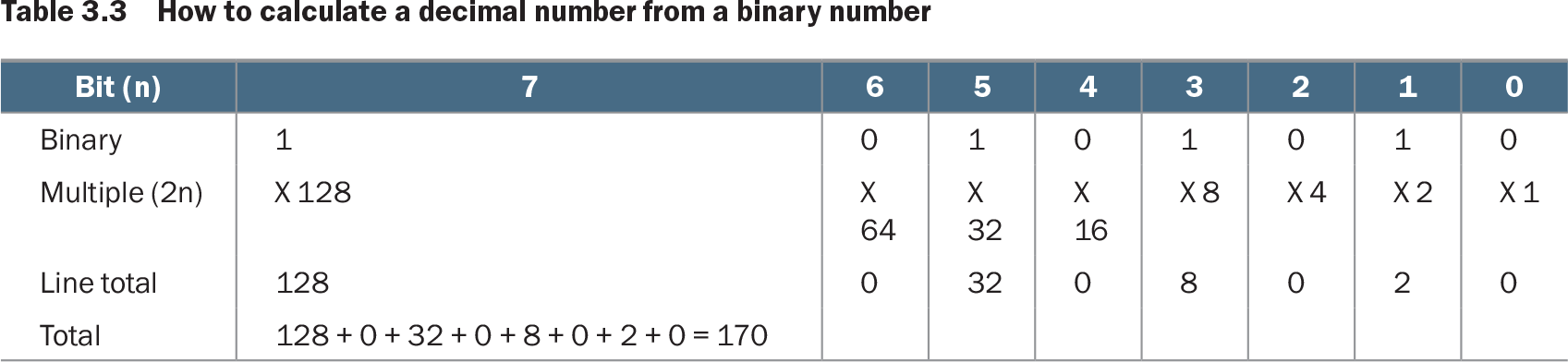
Table 3.3 How to calculate a decimal number from a binary number (view table figure)
| Bit (n) |
7 |
6 |
5 |
4 |
3 |
2 |
1 |
0 |
|---|---|---|---|---|---|---|---|---|
| Binary |
1 |
0 |
1 |
0 |
1 |
0 |
1 |
0 |
| Multiple (2n) |
X 128 |
X 64 |
X 32 |
X 16 |
X 8 |
X 4 |
X 2 |
X 1 |
| Line total |
128 |
0 |
32 |
0 |
8 |
0 |
2 |
0 |
| Total |
128 + 0 + 32 + 0 + 8 + 0 + 2 + 0 = 170 |
Read each position as a power of two, from 2⁰ at bit 0 to 2⁷ at bit 7. Add the values only where the bit is 1; 10101010 becomes 128 + 32 + 8 + 2 = 170. section 3.2.1
Packing controller buttons into one byte
To poll the first gamepad, write 1 and then 0 to strobe its port. Read the port eight times in a loop, keeping the needed input bits with AND %00000011. Compare the result to determine whether the current button is pressed, then use ROR to rotate that result into the accumulator. After eight reads, one bit for each button has been collected in a single byte and stored as the gamepad state. section 5.14.4 section 4.5