A box-and-whisker plot summarizes a distribution with quartiles, a median, whiskers, and optional outlier markers. The box spans Q1 to Q3: 25% of values fall below Q1, 50% below the median, and 75% below Q3. section 2.10.2
Read the plot by separating its main visual elements:
- The box displays the interquartile range between Q1 and Q3. section 2.10.2
- The median marks the central value, with half the samples below it. section 2.10.2
- Whiskers show how far the data extends; outliers may be displayed separately but can make interpretation less clear. section 2.10.2
Comparing Huffman running times
Group recorded running times by Huffman method and branching factor, then use boxplots to compare each distribution. The plots complement mean running times by showing variation across calls. section 2.10.2
Figure 2.19 Explaining how to read an example boxplot. Boxplots show the distribution of samples using a nice and effective chart. The main idea is that the most relevant samples are those whose values lie between the first and third quartile. That is, we find three values, Q1, Q2 (aka the median), and Q3 such that 25% of the samples are smaller than Q1; 50% of the samples are smaller than Q2 (which is the very definition of median, by the way); and 75% of the samples are smaller than Q3. The box in the boxplot is meant to clearly visualize the values for Q1 and Q3. Whiskers, instead, shows how far from the median the data extends. To that end, we could also display outliers, that is, samples that are outside the whiskers’ span. Sometimes outliers, though, end up being more confusing than useful, so in this example we will not use them.
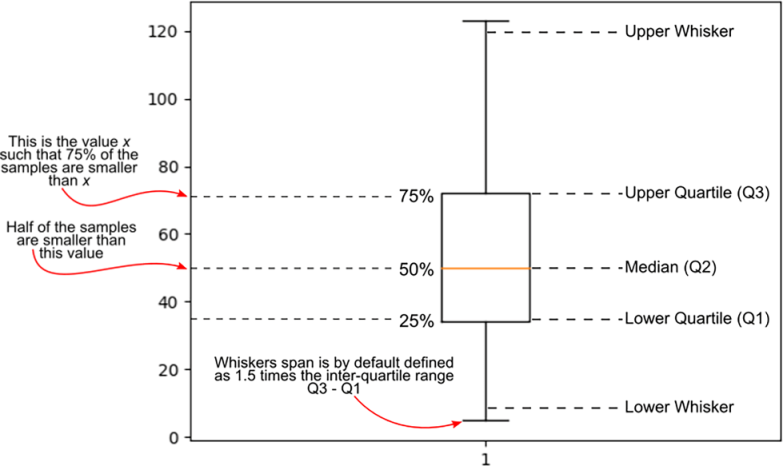
Use the annotated figure to connect Q1, the median, Q3, the box, whiskers, and optional outliers. section 2.10.2





