A cell is an interval-defined region of a feature subspace containing records with corresponding binned values. In counts-based outlier detection, a subspace is divided into cells and records in very low-count cells are treated as potential outliers. section 13.3.3
Interpret cells with these practical cautions:
- Recognize that bin counts depend partly on the chosen number of bins, making cell-based scores somewhat arbitrary. section 13.3.3
- Compare a record across many subspaces and dimensionalities, allowing errors from individual cell boundaries to average out. section 13.3.3
- Use populated sparse cells as explanation contexts rather than treating every rare cell membership as automatically meaningful. section 13.3.3
Figure 13.12 Part of the explanation for the outlier score for a single row, shown here as a star, in the context of one 2D subspace in which it was found to be in a sparse region, Diameter and Viscera_weight. The colors will not appear in black and white version of this book, but when using the tool, the colors clearly indicate the sparseness of each cell. In both the scatterplot and the heatmap, darker red is used for the sparse regions (but only the non-empty cells—those containing outliers), darker blue for the most populated cells, and medium tones for the moderately populated cells. The cells with counts of 23 and 36 can be clearly identified in both plots, providing context for the current row.
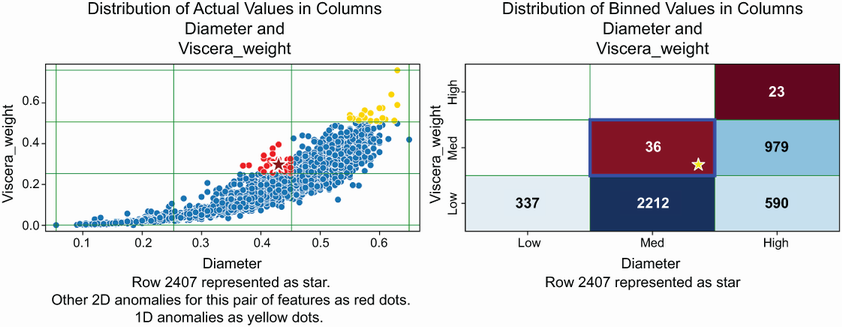
Visualize a flagged record as a point within a two-dimensional subspace, with cell colors and counts showing its sparse neighborhood. section 13.3.3




