A grid cell is the rectangular space where one CSS Grid row and one CSS Grid column intersect. Grid tracks occupy the spaces between neighboring grid lines, and cells sit within those tracks. section 2.3
Cells participate in CSS Grid layout in several practical ways:
- The browser normally places child elements into available cells, filling columns before creating additional rows. section 2.3.4
- An explicit grid defines its intended rows and columns; an implicit grid adds cells when more child items need placement. section 2.3.4
- Named adjacent cells can combine into a rectangular grid area, while a dot marks an intentionally empty cell. section 2.4
A named layout with an empty cell
In a five-row, three-column layout, the template can assign header cells across the first row, content cells across two columns, and a dot to leave one cell empty: "header header header", "content content author", "content content aside", "plays . aside", and "footer footer footer". Repeated names merge adjacent cells into rectangular areas. section 2.4
Figure 2.4 Grid structure based on English as the writing mode, with the direction set to left-to-right
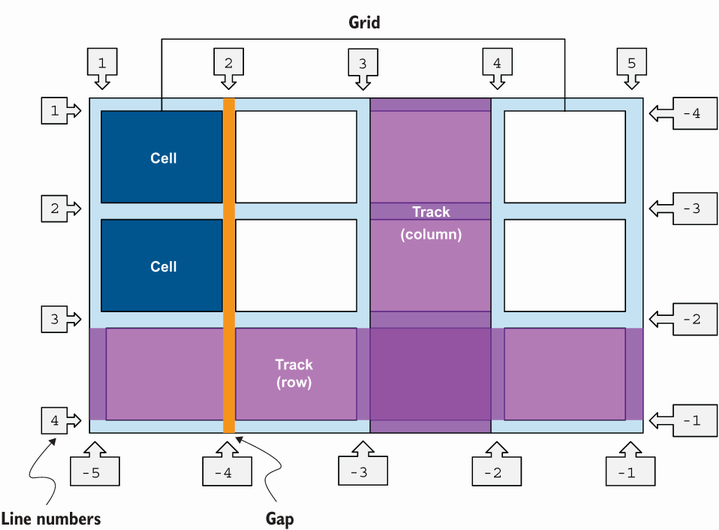
Use the grid diagram to distinguish grid lines, tracks, rows, columns, and the cells formed at their intersections. section 2.3




