A component is an executable or deployable unit that groups one or more application subdomains. Its form depends on the language and technology: a Java component might be an executable JAR or WAR, while another component might be an executable or a collection of source files. A library that must be packaged with other libraries is not itself a component. section 3.2.2 section 7.3.1
A central design decision is whether to package all subdomains in one component or distribute them across several. Operations that span components require collaboration, typically over a network. Components expose APIs through which others can invoke operations or consume published events. section 3.2.2
Partitioning a food delivery application
Consumer Management, Order Management, and Delivery Management can all be packaged into one component. Alternatives include a separate service for each subdomain, or an Order Service containing Order Management and Delivery Management alongside a Consumer Service. section 3.2.2
Figure 3.8 Two ways of organizing an application’s subdomains into components: grouping all subdomains into a single component (e.g., the monolithic architecture) or partitioning the subdomains into multiple components (e.g. the microservice architecture).
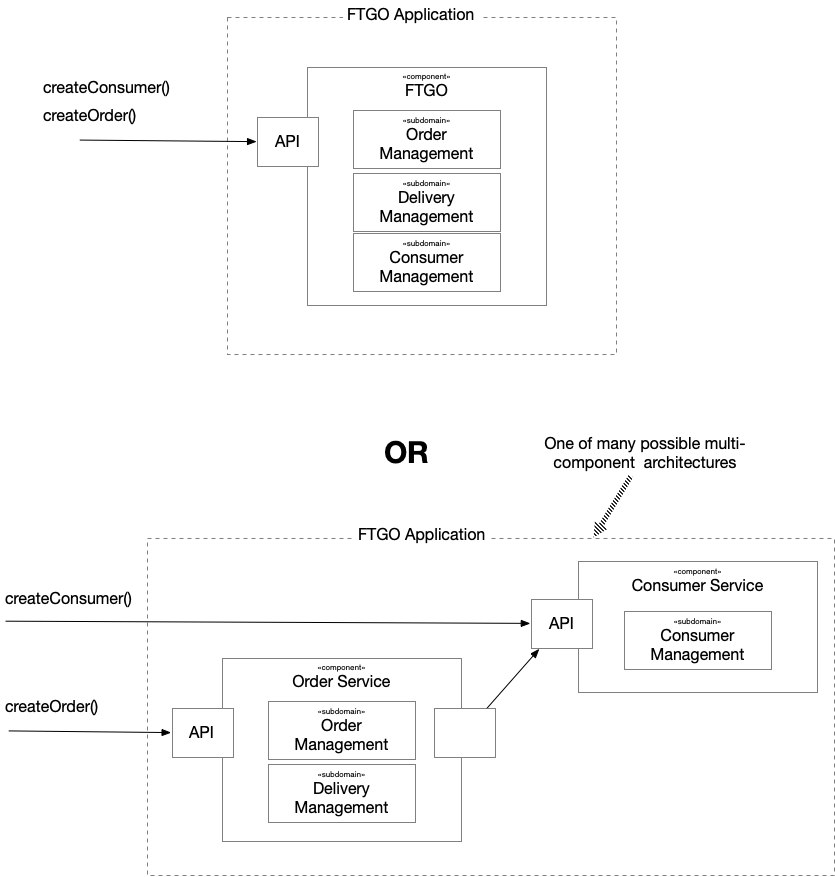
Compare a single-component organization with a partition into multiple components. section 3.2.2
Multiple components can improve evolvability: private technology upgrades may affect only one component, and broader upgrades can proceed incrementally. They can also limit the impact of a vulnerable library. The trade-off is repeated work when a library used by every component must be upgraded separately, while shared infrastructure upgrades may still require coordination. section 5.3.4
A microservice architecture organizes subdomains into two or more loosely coupled, independently deployable services. Packaging a service as a component is necessary but not sufficient for independent deployment: the service also needs its own build, test, and deployment pipeline and must be production-ready after testing in isolation. Choose the simplest architecture that works, and evolve it to address tangible problems. section 7.1.1 section 7.3.1 section 3.5