A worker node runs application workloads in a Kubernetes cluster. Pods contain the application containers; Deployments and ReplicaSets can place pods across multiple nodes. The control plane handles cluster coordination, while its scheduler assigns pods to nodes after checking available resources. section 1.4.1 section 4.1
Check these components when working on a worker node:
- kubelet keeps scheduled pod containers running, takes corrective action when a container fails, and reports status to the API server. It runs as a Linux service, not as a resource you inspect with kubectl. section 1.6 section 9.3.1
- kube-proxy supports Service traffic to pods. The container runtime runs containers; a kind cluster can use containerd. section 1.6 section 2.1.4
Figure 1.9 The role of the worker node is to run the application workloads. It also contains kubelet, kube-proxy, and the container runtime (e.g., containerd).
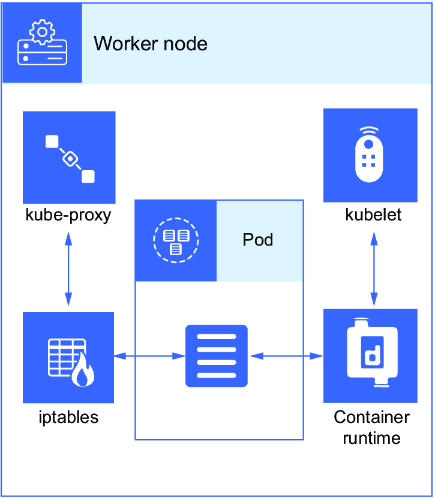
Use the worker-node diagram to locate application workloads alongside kubelet, kube-proxy, and the container runtime. section 1.6
Place a pod on a labeled worker
Run `kubectl get no --show-labels`, then `kubectl label no kind-worker disktype=ssd`. Set the pod’s `nodeSelector` to `disktype: ssd`, create the pod, and run `kubectl get po -o wide`. Check that the NODE column names `kind-worker`. This is a practical scheduling task: the label identifies the eligible node, and the wide output verifies the result. section 4.1
Diagnose a worker that is NotReady
Start with `kubectl get nodes`. In a kind worker container, inspect the node agent with `systemctl status kubelet`; stopping kubelet is shown changing that worker to `NotReady`, and `systemctl start kubelet` restarts the service. For a failing pod, use `kubectl describe po nginx` to inspect its status and events. section 2.1.4 section 1.6
Do not assume every cluster has a separate worker machine. A simple single-node kind cluster combines control-plane and worker components; the multinode setup separates them. For exam practice, be ready to distinguish node roles and check kubelet on the node itself. section 2.1.4 section 9.3.1





