A Kubernetes worker node is a machine that runs applications in a cluster. Worker nodes form the workload plane; control-plane nodes manage the cluster and decide where workloads run. Together, the workers appear as one deployment area. You request an application through the Kubernetes API rather than choosing a machine yourself, but each application instance still has to fit on a worker node. section 1.2.1 section 1.2.3
Applications run in containers grouped into pods. The scheduler assigns a pod to a worker node according to resource requirements and available resources. The kubelet on that node notices the assignment and starts the application through the container runtime. Node components also monitor applications and provide connectivity. section 1.2.2 section 1.2.4 section 1.2.3
Figure 3.8 The relationship between containers, pods, and worker nodes
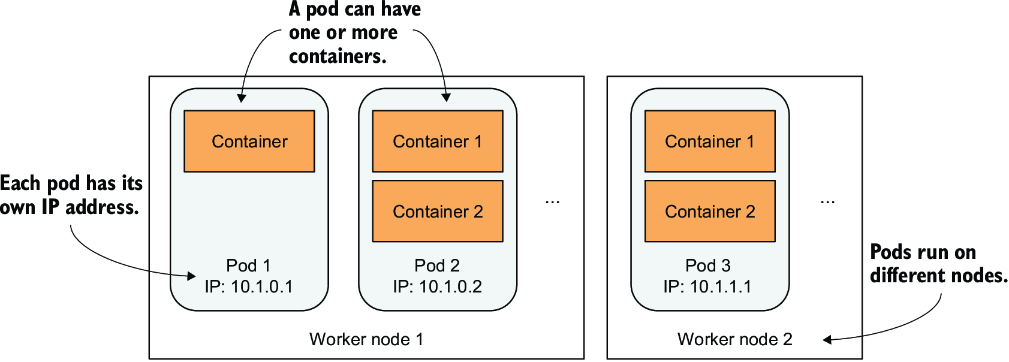
Use the container–pod–worker-node relationship to distinguish an application container from its pod and the machine hosting it. section 3.3.1
Find the machine running an application
Create a Deployment with `kubectl create deployment kiada --image=luksa/kiada:0.1`. Kubernetes creates a pod and schedules it to a worker. The pod's events can show the assignment, followed by the kubelet pulling the image and starting the container. Run `kubectl get nodes` to list cluster machines and check whether each reports `Ready`. section 3.3.1 section 4.2
Each machine has a Node object in the Kubernetes API, usually registered by its kubelet. Run `kubectl get node <node-name> -o yaml` to inspect its configuration in `spec` and observed state in `status`. For a more readable view, `kubectl describe node <node-name>` also shows pods on the node, allocated resources, and recent events. section 4.2 section 4.2.1 section 4.2.4
Check the Node object's conditions when a workload behaves unexpectedly. `Ready` indicates whether the node can accept new pods; `MemoryPressure`, `DiskPressure`, and `PIDPressure` signal resource shortages. A node that stops reporting to the control plane can become `NotReady`. Recovery depends on the workload: a ReplicaSet may create replacements while pods on the unreachable node could still be running, whereas a StatefulSet preserves stricter pod-identity guarantees. section 4.2.3 section 16.2.2





