A container image packages an immutable filesystem and metadata for instantiating a container. In a delivery workflow, a registry holds images that can be discovered and promoted between environments. section 3.0 section 3.5
For demo-app, version 1.1.0 is pushed to a registry, selected by a semver constraint, and pinned by digest in a Freight. A Promotion updates the dev GitOps overlay; Argo CD then reconciles the change, and a pod pulls the image. section 3.5
Figure 3.3 End-to-end promotion of the demo-app image, from the container registry to a running pod in the demo-dev namespace. The six lettered steps, A through F, mark the boundary between layers. Kargo owns steps A through D; Argo CD owns steps E and F. The Warehouse and Stage are Kargo resources living in the cluster; the GitOps repository and the Argo CD Application are infrastructure Kargo writes to but does not own. The Freight object is the lineage record that ties the whole chain together.
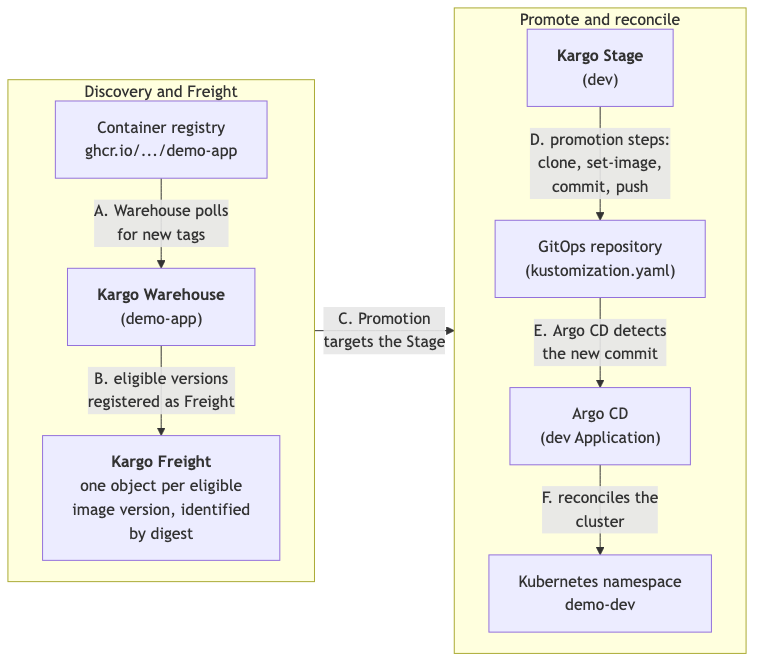
Trace the image from registry discovery through Git commit to a running pod, with the boundary between Kargo and Argo CD marked. section 3.5