Context engineering is the practice of giving a language model the information it needs for a task, at the right time and in the right form. A prompt is only part of that context: the model may also receive conversation history, tool results, and retrieved documents. In an agent, those inputs change after every tool call. The design problem is therefore not just what to say in a system prompt, but what to add, retain, remove, or keep outside the model’s context window. section 1.5 section 1.5.2
Five strategies organize those decisions:
- Generate: add model-produced plans or reflections that help structure later work. section 1.5.4
- Retrieve: bring in needed information through searches, queries, files, or document retrieval. section 1.5.4
- Write: save useful information outside the context, such as memories, intermediate results, or code. section 1.5.4
- Reduce: summarize, filter, or delete information so the context stays focused rather than accumulating unnecessary content. section 1.5.4
- Isolate: give separate environments or specialized agents distinct tasks instead of forcing everything into one context. section 1.5.4
A practical agent separates stored execution state from the request sent to the model. ExecutionContext holds the state used by the agent and its tools; LlmRequest contains the curated subset needed for one model call. When a tool runs, its result returns to execution state. The next request is another selection and formatting decision—not an obligation to send everything stored. This boundary makes missing information and excessive context easier to investigate. section 4.2.2 section 1.0
Keep tool details in a workspace
Suppose an agent can run Python, read files, and use additional skills. Including every tool definition in every prompt would fill the context with instructions that may not matter to the current task. Instead, keep core tools such as execute_python and bash_tool available, place detailed skill instructions in workspace files, and let the agent read a skill document when needed. Code generated for a one-time task can run through execute_python. This arrangement controls when tool information enters context and keeps execution results that need no model judgment out of it. section 8.5.5 section 8.6
Figure 4.3 Information flow in the agent architecture. ExecutionContext sits at the center, managing all execution state. Arrows show (1) context to LlmRequest to LlmClient for outgoing LLM calls, (2) LlmResponse back to context for incoming responses, and (3) bidirectional flow between context and tools for tool execution.
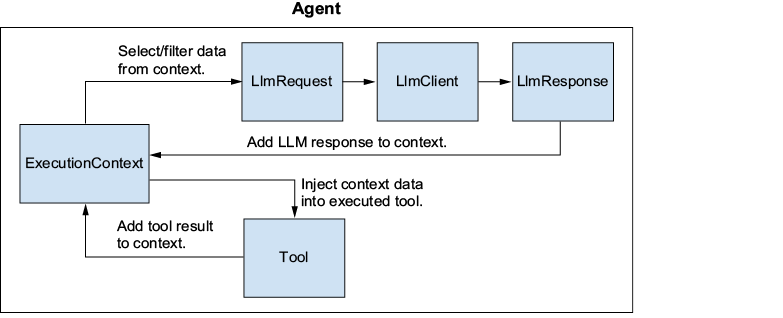
The information-flow diagram distinguishes all execution state from the curated request sent to the model, and shows how tool results return to state. section 4.2.2

