The CSS box model represents every element as four nested areas: content, padding, border, and margin. The browser lays these rectangular areas out in document flow, and each contributes to the element’s rendered size. section 3.2
Use the box model to reason about sizing and spacing:
- A declared width or height applies to the content area by default; padding and borders are added outside it. section 3.2
- A 300px width with 10px padding and 1px borders renders at 322px wide because both horizontal padding and borders count. section 3.2
- Using box-sizing: border-box makes declared dimensions include padding and borders, producing more intuitive sizing. section 3.7
- Explicit heights can create overflow when content grows, while margins may collapse outside a container. section 3.7
Padding can change alignment
Adding horizontal padding to a main content container narrows the usable text area. Adding the same padding to a wide page-header h1 does not narrow its content width; the padding is added outside the declared width, so its effective width grows instead. This explains why visually related text can stop aligning. section 3.2
Figure 3.7 The default box model
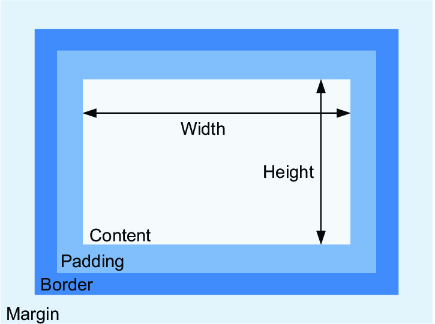
Use the default box model diagram to distinguish the content, padding, border, and margin rectangles and see how each layer contributes to size. section 3.2





