The CSS box model is a friendly way to picture every element as a rectangle with four layers: content, padding, border, and margin. These layers help organize a page by controlling its size, whitespace, and position. section 9.0 section 9.1
Imagine an element as a small package with these layers:
- Content holds the text, image, or other material inside the box. section 9.1
- Padding adds breathing room between the content and the border. section 9.1
- Border surrounds the content and padding with an edge. section 9.1
- Margin adds space outside the border, separating this box from others. section 9.1
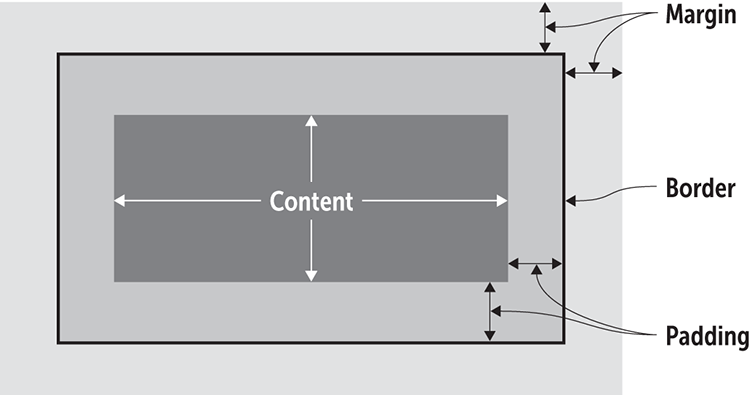
Use the figure to visualize the four nested regions and see how the box surrounds an element. section 9.1
Padding and margin create visual organization through whitespace, while box-related properties help move elements into a preferred layout. The model applies to block elements such as div, h1, and p, as well as inline elements such as span, em, and a. section 9.1
A menu with room to breathe
A list can use padding to separate menu items. In the example, the first li receives extra left padding to balance the final item's right padding and keep the menu centered. When the box edges are difficult to see, the outline property can draw a line around the outside of the border. section 9.10





