The CSS box model describes every element as four nested areas: content, padding, border, and margin. Content holds text or an image; padding adds space around it; the border surrounds that space; and the margin separates the whole box from its neighbors. The model applies to block elements such as div, h1, and p, as well as inline elements such as span, em, and a. It helps control both appearance and positioning by organizing whitespace and where boxes appear on the page. section 9.1
Think of the box from the inside out:
- Content: the inner rectangle containing text or an image. section 9.1
- Padding: extra whitespace between the content and border. section 9.1
- Border: the line surrounding the content and padding. section 9.1
- Margin: extra whitespace outside the border, separating the element from other boxes. section 9.1
Example: tame a very long line
A containing div with a width of 630px can make text easier to scan when the default line length stretches beyond 150 characters. For sizing behavior, CSS can also use box-sizing: border-box; if a set height causes content to spill outside its box, the overflow property controls that behavior. section 9.2
Figure 9.1 The main parts of an element box
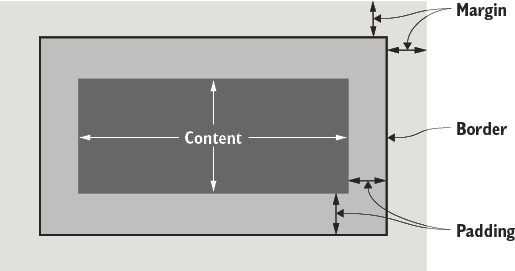
Use the element-box diagram to see how content, padding, border, and margin nest together. section 9.1





