A custom GPT is a configurable ChatGPT assistant for a specific task. It combines role instructions, uploaded knowledge, conversation starters, and optional capabilities so users do not have to repeat the same context in every conversation. section 2.1.1 section 8.3
Build one around a repeated workplace task:
- Choose a narrow role, such as a PowerShell assistant, SQL code reviewer, infrastructure documenter, or change-management helper. section 2.1.1
- Write instructions that define the job, response rules, boundaries, and the context the assistant should use. section 8.3.1
- Add conversation starters that give users useful ways to begin. section 8.3.1
- Upload relevant documentation, templates, configuration files, or support procedures as Knowledge. section 2.1.1 section 8.3.1
- Enable only the capabilities needed, such as web browsing, image generation, or code execution, then save and test the assistant. section 8.3.1
Ticket Analyst
A service desk team can create a custom GPT that analyzes IT service tickets. Its instructions can require categorizing problems and resolutions, examining comments and closure notes, and summarizing trends or anomalies. A user might start with: “Analyze this service ticket for major category, likely cause, resolution, and follow-up action.” section 8.2.3 section 8.3.1
Treat uploaded knowledge as sensitive. Keep assistants private when they contain policies, configurations, feedback, or other proprietary documents, and avoid uploading anything that should not be downloadable by a stranger. Review privacy and model-training settings before using confidential material. section 8.3 section 8.3.1 section 15.1.3
Figure 8.1 Custom GPT interface
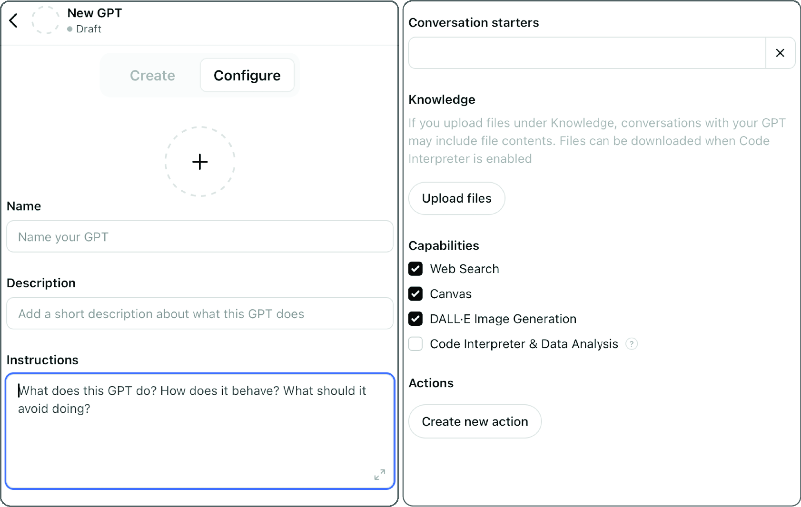
Use the interface overview to locate the GPT builder and understand the basic creation experience. section 8.3

