A custom GPT is a reusable, purpose-built GPT assistant configured with your instructions, supplied data, and desired skills. Instead of asking a general chatbot to improvise each time, you define a specialist for a focused job, such as evaluating blog writing or generating post titles. Existing specialists can also be found through Explore GPTs and the GPT Store. section 9.2 section 1.4.1
Start with a task that has clear, repeatable expectations. For example, a headline assistant can read a blog message and offer several titles, while a blog evaluator can assess a pasted draft’s main claim and supporting reasoning. The assistant supports editorial judgment; you still choose the title or improvement that fits your audience and site. section 9.2 section 9.3
To create a focused assistant for blog titles:
- Open ChatGPT, choose Explore GPTs, and select Create to open the GPT Builder. section 9.3.1
- Describe the role in plain language, such as “Make a headline writer who creates catchy titles for blog posts.” section 9.3.1
- Add specific guidance: request five titles, keep them appropriate to the post, avoid vulgar or highly technical wording, and limit title length. section 9.3.1
- Refine the guidance for your audience, including whether to use numbers, questions, benefits, or precise topic wording. section 9.3
Headline Helper
A blog post about pressure cooking might need a title even when its writer did not provide one. Configure a title-writing GPT to return several short options, then select the one that accurately reflects the post and appeals to the intended readers. Test alternative headlines when deciding which style works best. section 9.3 section 9.2
Treat a custom GPT as adjustable. If its output includes unwanted quotation marks or misses another preference, open My GPTs, choose the edit icon, and state the change directly. Check the next response: a requested change may require another attempt before the behavior matches your instruction. section 9.3.2
Figure 9.1 Click this icon to edit one of your GPTs.
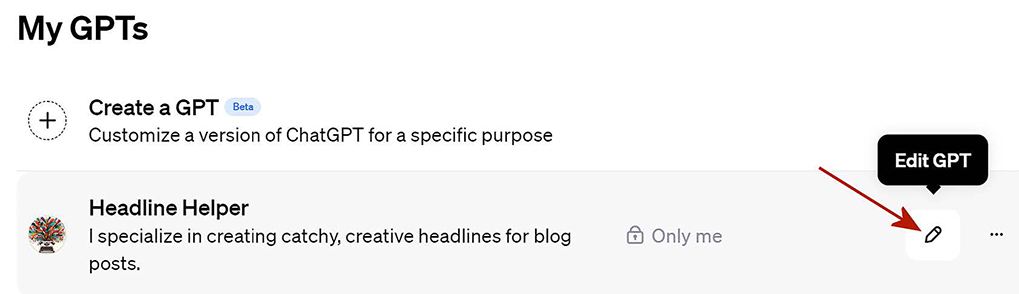
Use the edit control to return to a custom GPT’s builder and revise its instructions after testing its output. section 9.3.2

