When you open a web page, the browser does not already have everything it needs to display it. It acts as a client: an application that uses functionality provided by a server across a network. Desktop and mobile applications can be clients too; multiplayer games, for example, use servers to coordinate players’ actions. section 6.2 section 6.3
A browser builds a page through a series of requests and responses:
- The browser sends an HTTP request. The server processes it and returns a response, often an HTML page. section 6.2.1
- The browser renders the HTML. Links in that page can trigger further requests for CSS and JavaScript files. section 6.2.1 section 6.3
- JavaScript running in the browser can make more HTTP requests to update the page. section 6.3
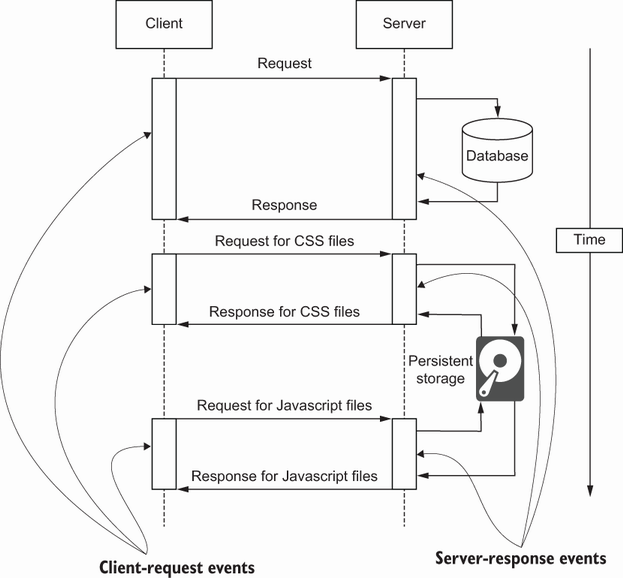
Follow the exchange over time: the client requests a page, receives HTML, and makes additional requests for files needed to render it. section 6.2.1
Each request is a separate exchange, but a session can help the server connect successive requests to the same user. The server creates a session cookie in a response; the browser includes it in later requests. This lets the application maintain information such as a user’s name or shopping cart across requests. The practical distinction is simple: the client requests and presents information, while the server supplies responses and can maintain information associated with the user. section 8.1.1 section 6.2.1














