Data binding associates each datum with a DOM element, letting a visualization generate its marks from data. In D3, a bar-chart rectangle can represent one technology and its count; the same pattern works for SVG and ordinary HTML elements. section 3.0 section 3.3 section 5.3
Start with a container selection, make an empty selection for the element type, supply the dataset, and join the elements. The empty selection is intentional: it gives D3 a place to determine how many elements the data requires. section 3.3
Create one rectangle per row
To make a bar chart, select the SVG container, select all rect elements, bind the dataset, and join rect. A dataset with 33 rows produces 33 rectangles in the DOM. Then use each bound datum in inline functions to set visual attributes. section 3.3 section 3.6
Figure 3.17 The data-binding process
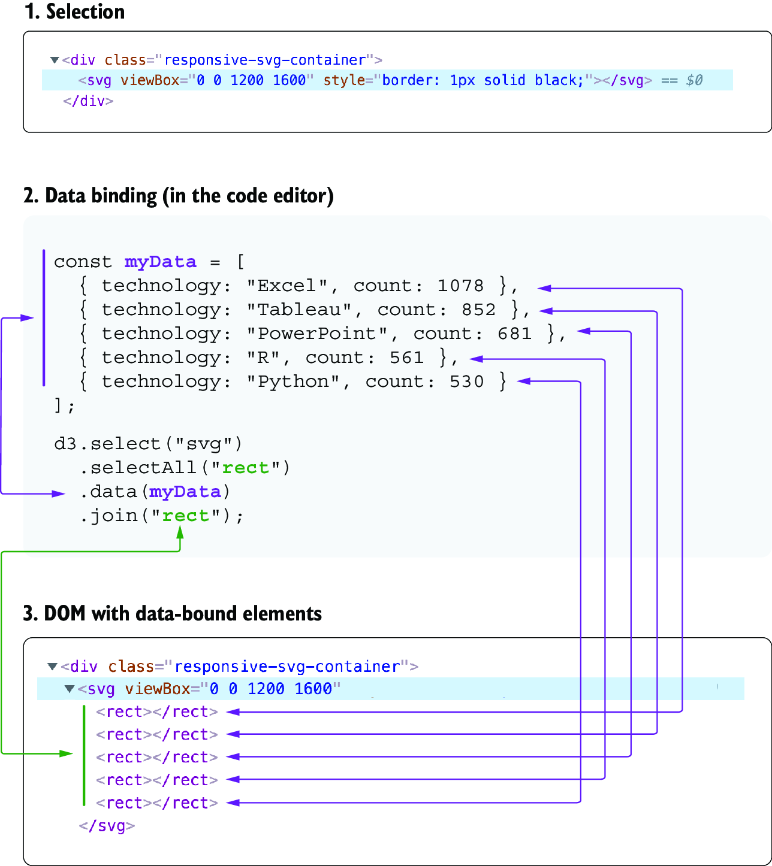
Follow the sequence from container selection to empty selection, dataset, and generated elements. section 3.3
Bound data is available to an element and passed to its children. Bind arc objects to SVG groups when both a path and a text label need the same values, such as angles, percentages, and centroids. section 3.6 section 5.1.4
Binding also supports updates. After filtering a scatterplot, bind the revised dataset again. A key function such as d => d.uid preserves the connection between surviving circles and their data; join can then distinguish entering, updating, and exiting elements. section 7.4.2 section 7.4.2
Use the same pattern beyond chart marks
Bind format records to list items to build a color legend, or bind filter records to buttons to create an interface. D3 can generate and manipulate any DOM element, not only SVG shapes. section 5.3 section 7.2




