Data binding connects a property on a user-interface element to a property on another object. Instead of reading a control in code and then assigning its value elsewhere, you declare the connection and let changes in the source update the target. In .NET MAUI, bindings can connect views to other views, views to code, and controls to commands. section 3.4 section 3.5 section 9.3.4
Figure 3.15 Each view (target object) can have a single binding context (source object). Properties of the target view are bound to properties of the same type on the source object.
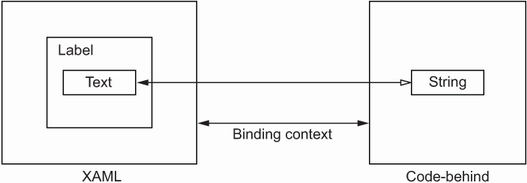
A view supplies a binding context—the default source object for bindings within that view. Child components inherit a binding context set above them, while an individual property can explicitly reference another object when needed. section 3.4
Set a binding on the target property, which belongs to a BindableObject; built-in .NET MAUI controls qualify. The source can be any object, but its property normally needs the same type as the target. When types differ, use a value converter. A binding context lets target properties refer to source properties by name rather than repeatedly naming the source. section 3.4 section 3.4
Mirror text and scale an image
Bind a Label’s Text to an Entry’s Text and the label updates as the user types, without code-behind. For another direct control-to-control connection, make an Image use a Slider as its binding context and bind Image.Scale to Slider.Value. Moving the slider then changes the image scale in real time; an event-based alternative would require a ValueChanged handler that assigns Scale on every change. section 3.4.1 section 3.4.1
Collections use binding to turn data into repeated UI. Bind a CollectionView’s ItemsSource to a collection such as an ObservableCollection of to-do items. Its ItemTemplate holds a DataTemplate describing each item’s layout. Inside that template, the binding context is the individual item, so a Label can bind Text directly to a property such as Title. section 3.4.2 section 3.4.2
Choose where to declare a binding based on the job:
- Use a view-to-view binding for interrelated controls with compatible properties, such as entered text and displayed text or slider value and image scale. section 3.4.1
- Use XAML bindings for a CollectionView when the page can provide the binding context and ItemsSource declaratively; this keeps bindings together in markup. section 3.4.3
- Use ViewModel bindings in MVVM to keep views focused on rendering and move presentation logic and actions into ViewModel properties and ICommand commands. section 9.3.4 section 9.5
Bind an inventory workflow to a ViewModel
A SearchBar can bind SearchCommand to an ICommand on a ViewModel. Search results can fill an ObservableCollection bound to a Picker, while SelectedItem and a Stepper count bind to ViewModel properties. A submit Button can bind Command to an ICommand that calls an inventory service. This leaves controls responsible for the UI and places presentation logic in the ViewModel. section 9.5 section 9.3.4
Prefer binding when a relationship should remain synchronized or when a list needs a repeatable item layout. Direct code access to named XAML controls still works for getting and setting values, but bindings remove repetitive coordination and become especially useful when organizing an app around MVVM. section 3.4 section 3.4.3




