Database design turns data requirements into a well-structured, efficient database. It organizes data so applications can query and change it reliably, while aiming for consistency, integrity, maintainability, performance, security, and room to grow. Poor structure can produce duplicated data, slow queries, bugs, and a frustrating user experience. section 1.1 section 3.2
A practical design process has three connected phases:
- Gather requirements by interviewing people who use the data, studying existing databases, and examining current information-management practices. section 3.16
- Analyze requirements and design a blueprint for the database’s structure and functionality. section 3.16
- Implement, integrate, and test the database against that blueprint. section 3.16
Start requirements work with the real workflow, not guesses. Identify the subjects involved, their characteristics, and the relationships among them. Ask for demonstrations and authentic, preferably anonymized, data samples; samples help verify the attributes and data types the design needs. section 3.14 section 3.16
Replacing an inventory spreadsheet
When an inventory spreadsheet will be replaced, ask the purchasing team to demonstrate ordering a batch, entering a new product, updating inventory, and removing records. The walkthrough exposes details that an interview alone may miss, while the spreadsheet data helps determine attributes and data types. section 3.14
Design decisions become concrete through entities, attributes, primary keys, data types, relationships, normalization, constraints, and cascade behavior. For example, a table that mixes customer and product information can create delete anomalies and insertion anomalies: deleting a product may also remove its only customer record, while a product with no buyer cannot be added. section 1.3 section 4.0 section 6.0
SQL is useful for creating, modifying, and querying tables, although a design can also be turned into database scripts with graphical tools. Common RDBMSs use largely consistent SQL, with vendor-specific variations. Generative AI can accelerate drafting and communication, but its output needs step-by-step verification and revision against the requirements. section 1.4 section 8.13
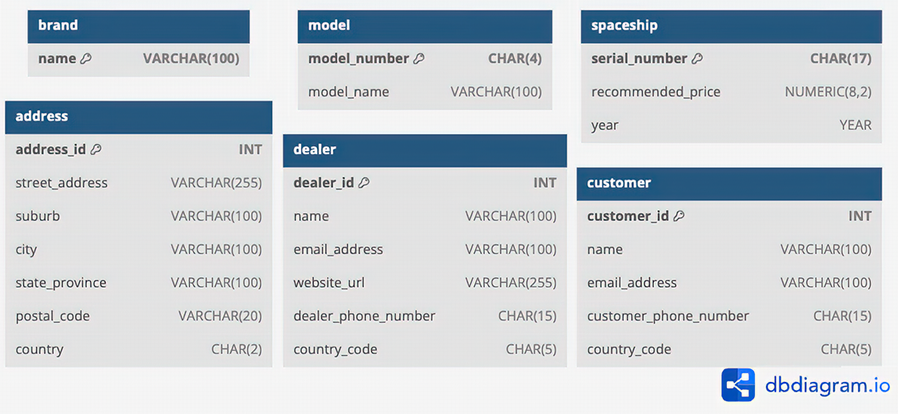
A SQL-generated diagram makes a text-based design easier to review and share with collaborators. section 8.6

