A dataset split, or sharding, divides a cache’s key space into distinct portions called shards. Each shard holds a subset of the keys rather than a copy of the whole dataset. A client uses a hashing algorithm to find the right node for a key and send its request there. section 11.6.2 section 11.2.1
Shard when one node cannot hold the data or handle the request volume. Adding shards increases total cache capacity and can increase read and write throughput. This differs from replication: a replica copies a primary shard’s data and adds capacity for reads, not a distinct portion of the key space. section 11.2 section 11.6.2
Choose a deployment that supports the split you need:
- ElastiCache for Memcached distributes keys across cluster nodes. Its client selects the node, but a failed node’s cached data is lost and cannot be restored from a backup. section 11.2.1
- ElastiCache for Redis with cluster mode disabled keeps all data in one shard. It supports replication, but not sharding. section 11.2.3
- ElastiCache for Redis with cluster mode enabled supports sharding, replication, and backups. Each shard has a primary node and can have replicas. section 11.2.4
Sizing a cache that has outgrown one node
Suppose the cached dataset is 22 GB and each cache node holds 4 GB. Six shards provide 24 GB of total capacity. If the dataset instead fits on one node, splitting it may be unnecessary; a 4 GB dataset fits on the cited 6.38 GiB node. section 11.2.4 section 11.2.3
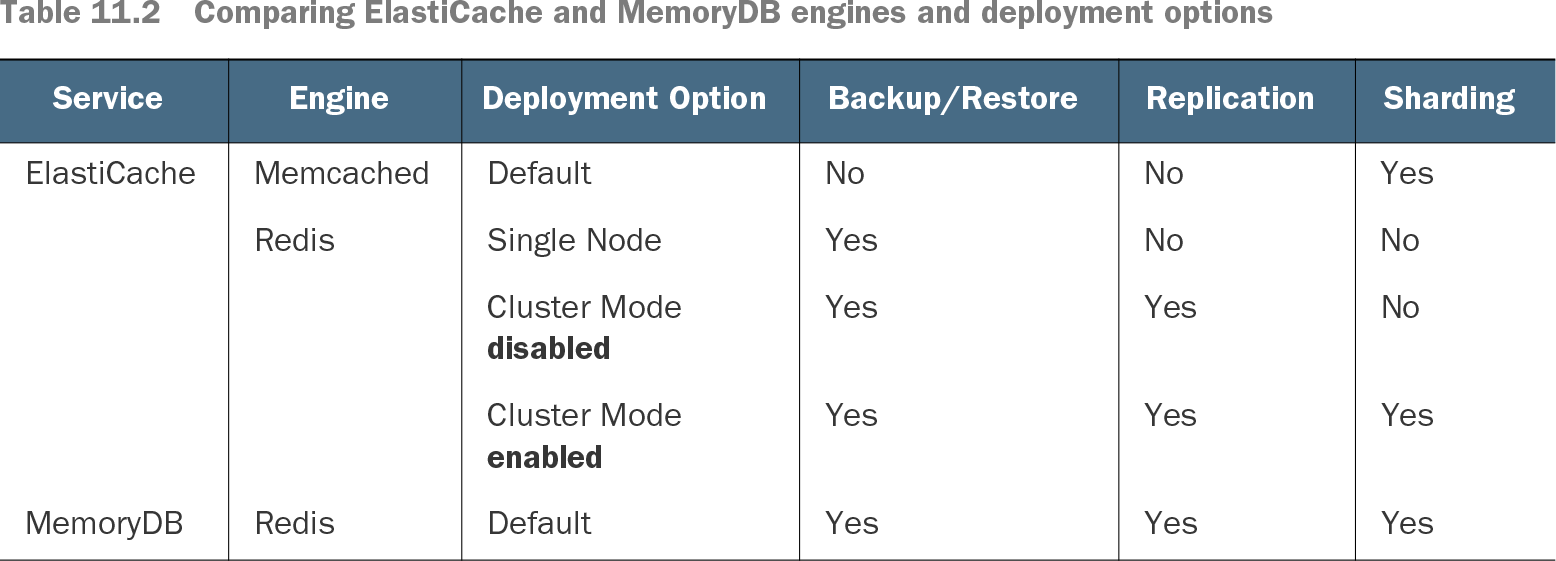
Table 11.2 Comparing ElastiCache and MemoryDB engines and deployment options (view table figure)
Compare which ElastiCache and MemoryDB deployment options support sharding alongside replication and backup or restore. section 11.2
When diagnosing a slow cache, check whether memory, CPU, or network pressure calls for a larger node, more shards, read replicas, or compression. With Redis cluster mode enabled, an evenly distributed second shard can halve the requests handled by each shard. Clients must be aware of the cluster topology to route commands correctly. section 11.6 section 11.2.4 section 11.6.2