dbt is an SQL-centric transformation tool for building modular, documented, tested, and deployable data pipelines. It applies software-engineering practices such as version control, portability, modularity, and CI/CD to data transformations. section 8.3
With dbt-duckdb, dbt uses DuckDB as a processing bridge rather than a permanent store: it reads raw files, runs SQL transformations, and writes results such as Parquet files. section 8.3
A practical dbt project progresses through these steps:
- Create a project with dbt init, choose DuckDB as the database, and configure profiles.yml with the output path and schema. section 8.3.1
- Define external sources in sources.yml, giving raw data stable names, metadata, and references for models. section 8.3.2
- Write models as SQL queries or Python scripts; use configurations to control materialization, output location, and file format. section 8.3.3
- Run dbt run, inspect the generated artifact with DuckDB, and use dbt test to validate the transformation. section 8.3.3 section 8.3.4
Transforming tennis CSV files into Parquet
A model reads ATP match CSV files from GitHub, removes winner- and loser-detail columns, converts tourney_date to a date, filters missing surfaces, and writes output/matches.parquet. Starting with 2023 produces 2,986 rows; expanding sources from 1968 through 2023 produces 188,934 rows. section 8.3.3 section 8.3.5
Tests are assertions attached to models and columns in schema.yml. Built-in checks cover non-null values and accepted values; dbt_expectations adds type and range checks. When broader historical data breaks assumptions, test failures expose invalid surfaces, missing values, and date ranges that require revised models or assertions. section 8.3.4 section 8.3.5
Figure 8.3 Transforming CSVs to Parquet
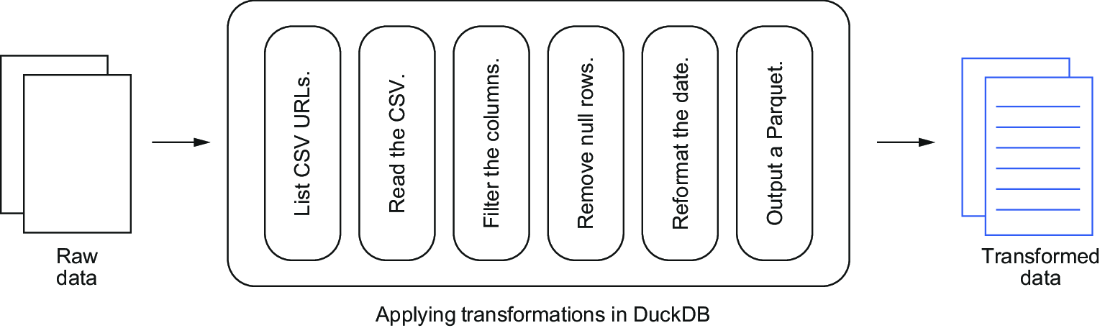
Use the pipeline diagram to trace the movement from remote CSV inputs through dbt and DuckDB to Parquet output. section 8.3


