liveBook · Manning

Debugger

As explained in Pro ASP.NET Core 7, Tenth Edition

A software tool that pauses program execution and allows inspection of program state while diagnosing errors.

A debugger pauses an ASP.NET Core application at a chosen statement, then lets you inspect and control execution while investigating what the program is doing. section 4.5

Use a debugger by:

  • Opening Program.cs in the project. section 4.5
  • Toggling a breakpoint on a code statement through Debug > Toggle Breakpoint in Visual Studio or Run > Toggle Breakpoint in Visual Studio Code. section 4.5
  • Starting debugging and continuing until execution reaches the breakpoint. section 4.5
  • Controlling execution with debugger menus or the displayed controls. section 4.5

A practical alternative

For quick investigation, run the application with dotnet run and add Console.WriteLine statements. Serialize an object to JSON and write the result when its contents need inspection. This is especially useful when an if condition prevents a statement from being called. section 4.5

Figure 4.7 Setting a breakpoint
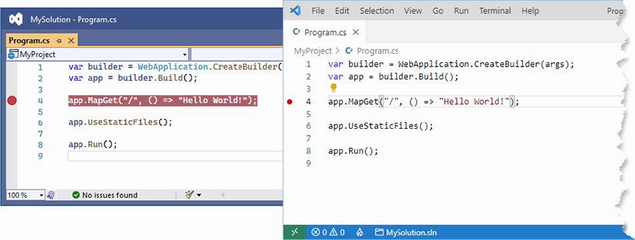
A breakpoint appears as a red dot beside the selected statement. section 4.5


How Pro ASP.NET Core 7, Tenth Edition covers it

How deep it goes
Demonstrates breakpoint setup and execution control, but defers the debugger’s extensive features to external documentation.
Examples
Uses a Program.cs breakpoint, debugger controls, Console.WriteLine output, and JSON serialization for object inspection.
What it assumes
Assumes a runnable ASP.NET Core project and familiarity with either Visual Studio or Visual Studio Code.
What you can do after
Diagnose execution flow by setting breakpoints, halting an application, and controlling its progress.
How it connects
Connects ASP.NET Core development with Visual Studio, Visual Studio Code, dotnet run, Console.WriteLine, and JSON serialization.

Also explained in

Compare how 6 books explain debugger →

Related concepts

This explainer was generated by Manning's knowledge graph from the text of Pro ASP.NET Core 7, Tenth Edition. The section links point to the parts of the book it draws on.



