A debugger pauses program execution at a chosen instruction, lets you run code step by step, and exposes how values change. It reduces the cognitive effort of following non-linear logic and helps investigate behavior, not only bugs. section 1.1 section 2.2
Use a debugger when you know which logic to investigate and need to connect instructions with runtime data.
- Place a breakpoint on the first unclear instruction, run the application under the debugger, and inspect variables in scope and the execution stack. section 2.2
- Step over to continue within the current method, step into a called method when its behavior is unclear, and step out to return to the previous investigation plan. section 2.2.2
- Avoid relying on it alone when the output source is unknown, performance is poor, the application has crashed, execution is multithreaded, or timing affects behavior; use profiling, logging, stubs, or thread dumps as appropriate. section 2.3
Tracing a decoder
Given a Java Decoder.decode method that extracts digits from each input string and sums them, set a breakpoint at the first unclear extraction line. Step over it to inspect digits and the running total; step into extractDigits() only if the resulting value remains unexplained. Use step out to return without manually traversing every instruction. section 2.2 section 2.2.2
Figure 1.4 Using a debugger, you can pause the execution before a particular instruction and then observe how the app’s logic changes the data by manually running the instructions step by step.
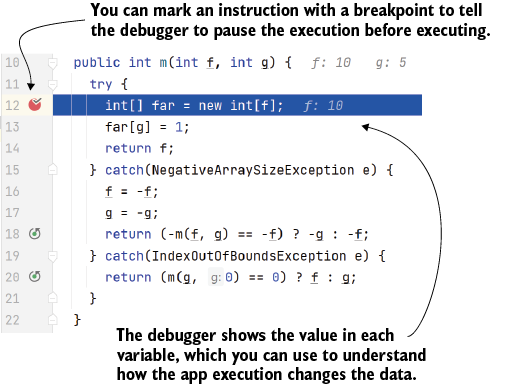
Shows the debugger pausing before an instruction and revealing data changes through manual, step-by-step execution. section 1.2.1





