A default value is a predefined parameter value used when a user does not provide one. It keeps optional inputs usable while allowing deliberate overrides. section 10.5 section 11.2.1
Choose defaults while separating parameters into mandatory inputs, optional inputs, fixed values, and values derived through script logic. This prevents users from supplying information the automation can calculate or safely assume. section 10.5 section 11.2.1
Apply default values in practical automation designs:
- Set a default virtual-machine location, then append the virtual-machine name to construct the working path. section 10.5
- Use the main SharePoint site's time zone, or provide a selectable time-zone list and fall back to a default when nothing is selected. section 11.2.1
- Derive a site's URL from its title and remove illegal characters instead of asking users to understand URL restrictions. section 11.2.1
Figure 10.2 Hyper-V virtual machine creation parameters broken down into buckets for mandatory (values that must be supplied), optional (values that have a default value but can be overwritten by the user), fixed (values that are hardcoded), and logical (values that are determined by logic in the script)
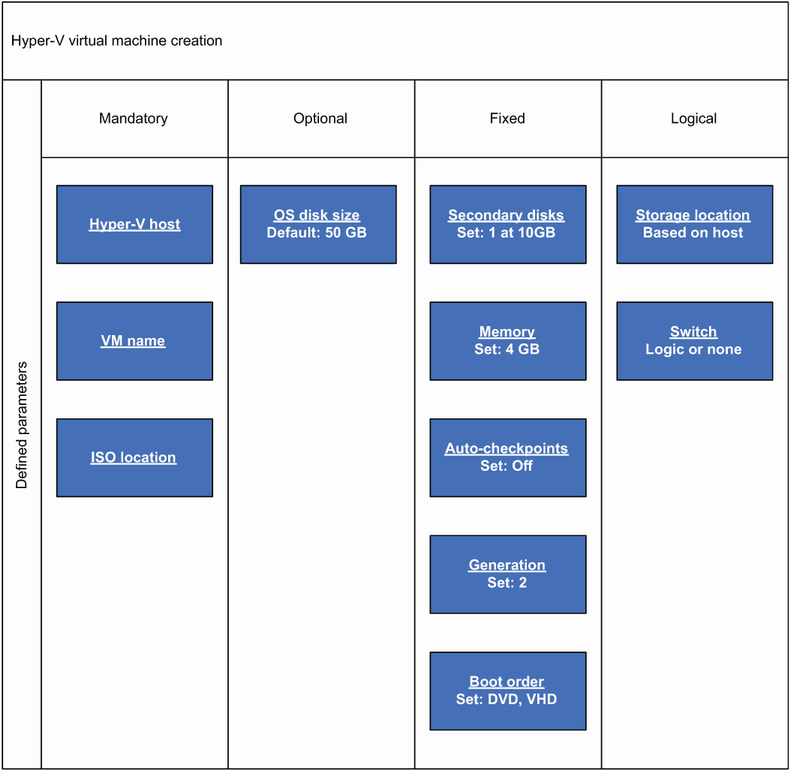
Compare defaulted optional parameters with mandatory, fixed, and logic-derived values when designing an automation interface. section 10.5



















